Nicholas TongWyze Cam v4
39 / 46
Wyze Cam v4: the camera is $36, the cloud is the product
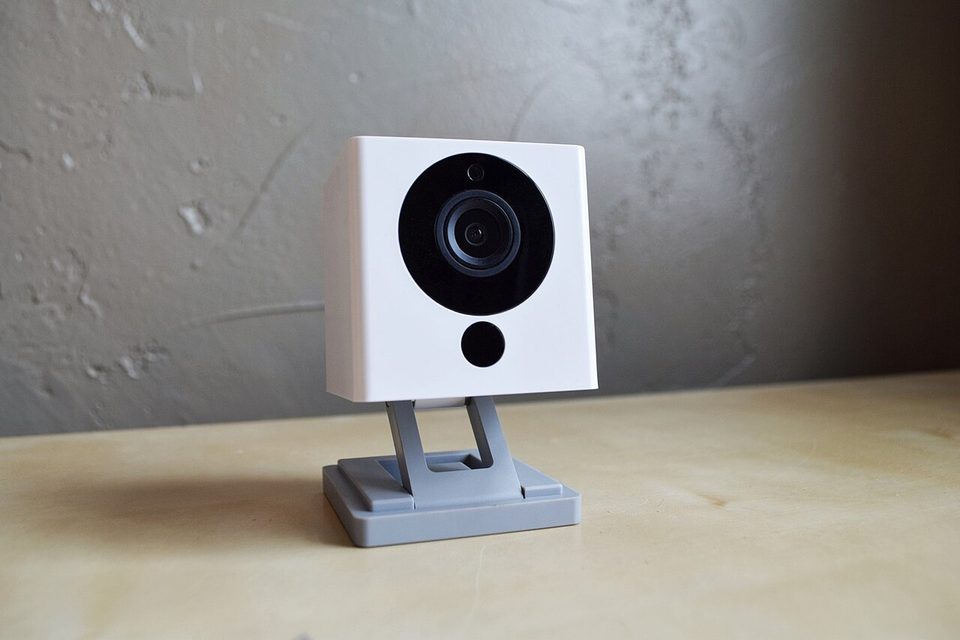
On February 16, 2024, Wyze's servers went down, and every camera they sold went blind with them. The outage itself was a normal Tuesday in this industry. What came after wasn't: as cameras came back online, about 13,000 users received event thumbnails from cameras that weren't their own, and 1,504 people tapped on them, and in some cases that tap opened someone else's home. Wyze confirmed the numbers themselves on their forum, The Record covered it the way it deserved, and a smaller repeat incident followed that summer. I own four of these cameras and I spent part of that February weekend answering questions about them from my aunt, who runs a shop off Bellaire and does not read security forums, because she'd heard about it from a customer instead.
Start there, because that story is the actual review. The hardware is the cheapest capable camera on the market, and the cloud is the product, and in February 2024 the cloud showed all of us what that means.
the part everyone gets wrong
The wrong read is the price. People treat $36 as the whole cost, as in "it's cheap, what do you expect," and that sentence is doing two jobs at once: excusing the company and excusing the buyer. Here's the thing. The camera is a sensor with a lens. The service behind it is a data pipeline that ingests your motion events, generates the thumbnails that crossed accounts in the incident above, and upsells you continuously to make the pipeline better. The camera is the cheapest part of the system, and it's the part least likely to fail you. The failure mode that put strangers in strangers' events tab lived entirely in the cloud layer, on servers nobody buying a camera thinks about.
The second wrong read is the "no subscription required" line, which is true the way a toll road with a frontage road is true. Wyze's own product page says it: no subscription needed. What that means in practice is 12-second cloud clips with a five-minute cooldown, which is an event log with the interesting parts truncated. The full-length recording, the person and vehicle detection that makes alerts worth reading, the facial recognition, all of it lives behind Cam Plus at $3 a month per camera, or $10 a month for unlimited cameras, with a $4 tier on top that adds professional monitoring. PCWorld's March 2024 review put the subscription section under the heading "Subscriptions aren't truly optional," and I can't improve on that headline. What actually is optional is the cloud entirely: the camera records 24/7 to a microSD card you buy for twelve dollars, and that's the configuration I'd argue is the real product.
the mechanics
The hardware punch list, quickly because it's all real: 2.5K resolution at 2560 by 1440, a 115.8-degree diagonal field of view, color night vision plus infrared, a spotlight at 72 lumens with two brightness levels, a siren that can hit 99dB, two-way audio, IP65 weather resistance for outdoor mounting, and Wi-Fi 6 support, which turns out to be limited to the 2.4GHz band, so keep your expectations about the 6 in the name adjusted. Power is a hardwired pigtail, no battery option, which annoyed me for exactly one evening until I remembered that a battery camera with a dead battery is a paperweight with opinions.
The part I respect most is under the housing: a 1.4GHz dual-core processor doing detection on the device itself. Person, pet, vehicle, and sound events (it distinguishes a baby's cry from a cat's meow, and yes I have tested the second one, twice) get classified locally rather than shipped to a server to be thought about. That's both a latency win and a smaller data footprint, and it's the feature I wish they advertised as loudly as the price.
Setup is a button press and Bluetooth pairing, no QR code gymnastics, and the app is genuinely good at skimming recordings via thumbnails with icons for what triggered them. Alexa, Google, and IFTTT all work. Apple Home doesn't, at all, which matters to exactly half the people I know and doesn't to the other half.
where it breaks
The cloud break you've already read. Beyond the incident, note the structural fact it revealed: the event pipeline is centralized, and when it fails, it fails in a direction that leaks across accounts. Wyze's own forum timeline, and their slow, criticized disclosure during that week, is worth reading in full, because the incident wasn't a hack in the movie sense. It was a misconfiguration during recovery, the boring kind, the kind that happens at every company, which is exactly why it should change how you think about the architecture rather than the vendor's moral character. There's also history here: in 2019 an exposed database leaked user emails and API tokens, which is the kind of thing a company that stores credentials should never have available to leak.
The cooldown break is the practical one. Without a plan, cloud clips are 12 seconds with a five-minute cooldown, and anyone who has watched a package theft knows five minutes is a whole category of crime. The microSD card has no such limit: 24/7 continuous recording, up to 512GB, which on this camera is about three weeks before it loops. That's the configuration I run everywhere.
The admission: I told my aunt the cloud part didn't matter for her stockroom, because the inventory angle can't be blackmailed and the footage is dull. That was February 2024. After the incident I spent one full evening at her shop after close, a register beeping intermittently the whole time, redoing every account with a unique password and MFA and moving all four cameras to SD recording. The cameras were never the work. The accounts were the work, and I'd treated them as an afterthought on a $36 device, which is precisely the thinking the incident punished.
The small breaks: the pigtail power cable is short enough that half my outlets need an extension cord, my dad saw one of the resulting power strips on a visit and Sharpied "CAMERAS, DO NOT UNPLUG" across it, which is the most effective labeling system in my house. The app's upsell prompts are constant. And the 2.4GHz-only Wi-Fi 6 is a spec-sheet asterisk, not a feature.
what to do
- Buy the microSD card the same day as the camera and set continuous recording. The free cloud tier is an event log; the card is the actual surveillance.
- Treat the Wyze account like a bank account: unique password, app-based MFA, an email you check. February 2024 is the argument for the parts you'll skip.
- Put the camera on your IoT VLAN. It's a cloud-first device with a microphone and a siren on your network, and it should live with the other appliances, not next to your file server.
- Skip Cam Plus unless the alert fatigue is real; if it is real, the $10 unlimited tier is the only version of the plan that makes sense at more than three cameras.
- Don't point it anywhere intimate. It's a cloud camera with a documented cross-account incident. Your kitchen is someone's data center's business model, and you should decide that on purpose.
One of the four still runs in the stockroom door window, 24/7 to a card that has looped maybe nine times since February, and the thumbnail library on my phone is exactly as boring as I promised her it would be. The cloud never misbehaved again. I stopped trusting it anyway.
Twelve dollars of SD card beats thirty-six dollars of apology.