Nicholas TongTESmart dual-monitor KVM switch (2-port HDMI class)
33 / 46
TESmart dual-monitor KVM: six cables and one trust boundary
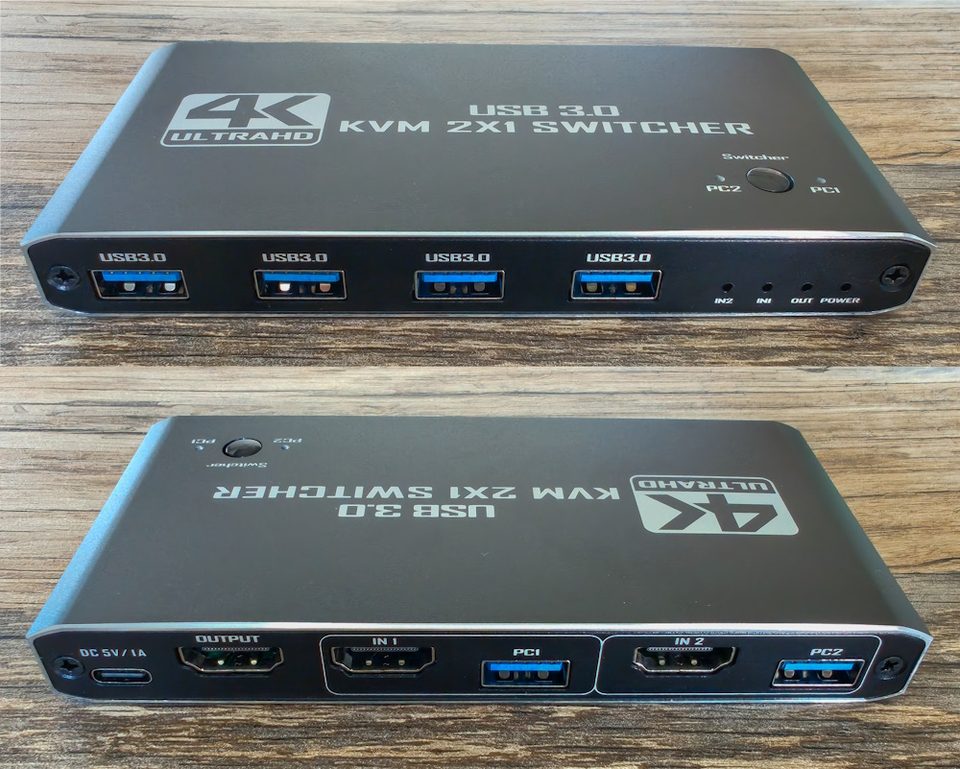
There are six HDMI cables behind my desk right now, and every one of them is labeled with tape I cut from a garbage bag. That's not an accident and it's not me being precious. TESmart's own manual tells you to lay out and mark the cables before you push the desk against the wall, and the manual is right, because a fully wired dual-monitor KVM is a wiring diagram pretending to be a desk accessory. I learned that the honest way: on the first Saturday I had it, I swapped one feed, spent an hour blaming a perfectly good monitor, and ended up under the desk with a phone flashlight deciding that labels were now a permanent part of my life.
What the thing is: a two-host switch that carries one keyboard, one mouse, and two monitors between two computers. Mine is the HDMI-plus-DisplayPort flavor at around $240; TESmart's plain two-port dual-HDMI kit lists at $199.99 on their own store, and the same company sells a DisplayPort 1.4 model with 8K support at $329.90 and a Thunderbolt-flavored one at $699, so the line climbs fast. The ceiling everyone buys it for is 4K at 60Hz with 4:4:4 color, which is a productivity ceiling, and the honest summary is the one SolderMag's August 2026 review gave it: a sensible KVM for two computers that can each feed two displays, on a desk willing to do the cabling.
the part everyone gets wrong
The first wrong read is on the listing itself, which calls one of these a docking station. It isn't. It doesn't create display outputs your laptop doesn't have, it won't charge a laptop, and if your machine only drives one external monitor, this box doesn't fix that, it just moves the problem in front of you. A work laptop usually needs its own dock before the KVM eats, and every dock in the chain is another thing to blame when a screen goes black. I want to be careful here, because I don't think TESmart is hiding this. Their support docs are unusually clear about it. The marketing copy just doesn't carry the warning, and people buy it for a one-cable life it cannot provide.
The second wrong read is mine to own, because I made it for a week: I treated the KVM as furniture. It isn't. It is the one device that physically joins my work laptop and my personal machine at the same time, which makes it a bridge between two trust boundaries that my employer's security team otherwise keeps a country apart. The keyboard and mouse stay enumerated on both computers, waiting. The shared USB 3.0 port follows whichever machine is selected. Nothing here moves your data, which is why KVMs pass every policy review, but the peripherals move, and peripherals are where mistakes live.
the mechanics
The wiring map, done once, properly: each computer contributes two video feeds plus one USB data line, which arrives as a bundled KVM cable with HDMI and USB-B together, and the switch runs two more HDMI cables out to the monitors. Add the 12V power brick and you have the six behind my desk. EDID emulation is the feature that justifies all of it: EDID is the little identity packet a monitor hands a computer, and the switch fakes it for whichever machine is inactive, so the work laptop always believes both screens exist and doesn't collapse my windows into a heap every time I walk away. Without it, switching home to work means watching Windows rearrange itself like a store after a break-in.
The switching itself is the boring good part. Front buttons, a keyboard hotkey with Right Ctrl as the default trigger, an infrared remote about the size of a car fob that I have used twice out of politeness, and a double-press of Right Alt that moves keyboard and mouse focus independently of video. That last one is display mode 2, where each monitor shows a different computer, and it's the trick that makes the box feel overbuilt in a good way. Audio follows the switch or moves separately by hotkey, headset and microphone both.
where it breaks
Keyboards are the documented failure. TESmart's own support notes call out proprietary keyboard protocols and high power draw as causes of lag and repeated keys, and their recommended fix is to test on the dedicated keyboard/mouse ports and drop the fancy features. My daily keyboard is a wired mechanical board with no software and it's flawless. My colleague's low-profile wireless thing with three radios repeats letters like a nervous witness. If your keyboard is a computer, your KVM is now a computer that doesn't like computers.
EDID has an asterisk worth typing out: the emulator applies in the standard mode where both monitors follow one computer. In the split mode with one machine per screen, TESmart documents no such persistence, and SolderMag's review flags exactly that limitation. Know which mode your muscle memory lives in before you promise anyone anything.
Then there's the ceiling. 4K60 with full chroma, and the documented extras are things like 3440 by 1440 at 100Hz and 1080p at 240Hz. No 4K above 60, no 5120 by 1440 at all, no variable refresh guarantees. Fine for code and spreadsheets, which is what I do with it. Wrong box for a high-refresh gaming desk, and TESmart sells the right box at more than three hundred dollars if that's your life.
And support is the long-term question. The Amazon reviews average solidly but not warmly, and one of them says it better than I can: "Mostly works, until it doesn't. Support is useless." Nothing on my unit has failed in eight months. But this is a Chinese manufacturer selling direct with no local service layer, and a KVM that dies takes your entire desk down with it, both machines, both monitors, one Tuesday.
My admission is the one that still stings. The shared USB port held my webcam for exactly one week, because it was convenient and because I had thought about it for zero seconds. Then I joined a standup from the home machine while the camera was still bound to the work one, and the work laptop's camera light came on in an empty room with my calendar on its screen. Nothing happened. Nobody saw anything. I unplugged it in about four seconds and the webcam lives on the personal machine permanently now, on its own cable, because the whole point of the two machines is that they don't share, and I had built a bridge through the device most likely to embarrass me.
what to do
- Count your cables before you buy: two video feeds and a USB line per computer, two outputs to the monitors, one power brick. If a laptop needs docks and adapters to get there, price the whole chain, not the KVM.
- Label every feed at both ends. The manual asks. Do what the manual asks.
- Put the keyboard and mouse on the dedicated ports and keep one genuinely shared device on the USB 3.0 port at most. A webcam is not a shared device. It's a decision about which machine gets your face.
- Set the hotkey trigger to a key your keyboard actually has, and test your real keyboard before the cables disappear behind the desk.
- Assume the EDID persistence only exists in single-computer mode, and check window layouts after the first week, not after the first month.
The KVM sits on the shelf under the monitors with its little amber power light, and the IR remote lives in the drawer where the batteries for things I don't need live. Right Ctrl, Right Ctrl, and the whole desk changes owners in about a second and a half of black.
Six cables. All of them labeled. Every one of them on purpose.