Nicholas TongLogitech MX Master 3S wireless mouse
34 / 46
Logitech MX Master 3S: the mouse that wants to be middleware
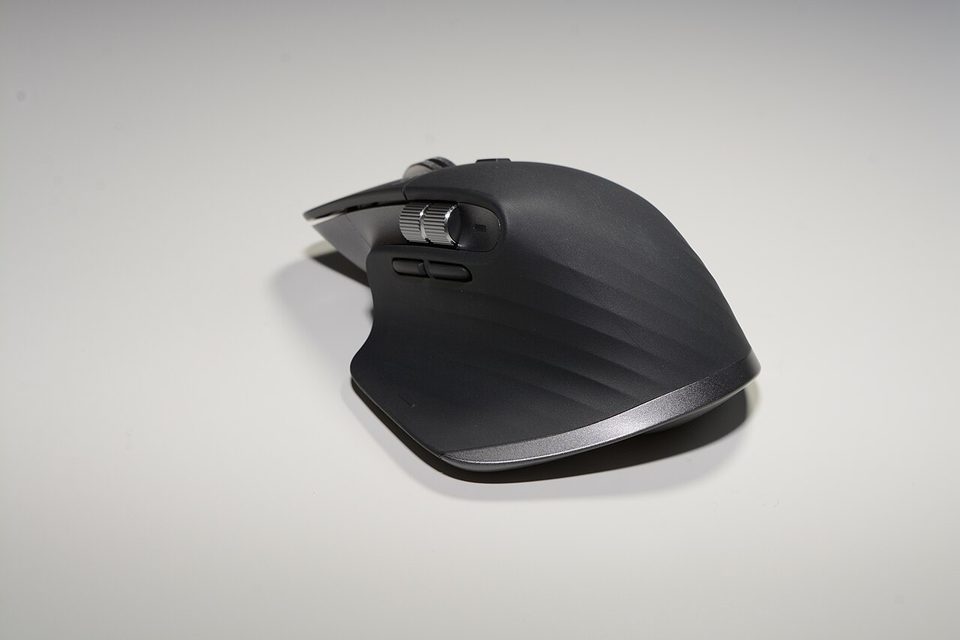
At 3:07am during a patching window last year, I fixed a stuck deployment by pasting a curl command from my personal laptop onto the work one, and the paste worked because my mouse had quietly carried the clipboard across. No VPN jump, no shared drive, no thought. The mouse did it. Flow, Logitech calls the feature, and it's wonderful, and I have thought about that night roughly every week since, because the most privileged piece of software on my desk turned out to be the one that comes with batteries.
The hardware first, because the hardware is why anyone owns this thing. The 3S is a $99.99 mouse, a figure that has drifted upward in some listings since the MX Master 4 arrived at $119.99 and pushed this one into sale territory around $80 to $90. It has an 8,000 DPI Darkfield sensor that tracks on glass, click switches tuned to be about 90 percent quieter than the 3's, the MagSpeed electromagnetic scroll wheel that spins free like a flywheel, a second horizontal wheel under the thumb, USB-C charging good for roughly 70 days, and Easy-Switch pairing across three computers. TechGearLab ranked it first among ten wireless mice in August 2025 on the strength of comfort and tracking, two years into its life, and that ranking is the least surprising sentence in this post.
the part everyone gets wrong
The wrong read is "it's a mouse." A wireless mouse is a radio, an HID device, and a firmware target, and on this one you add a configuration daemon, a clipboard bridge, and an account. The mouse is the most trusted process on your machine that nobody treats as software. It sits at ring zero of your attention: your hands never stop touching it, it can type (every button is a macro), and its dongle is a wireless receiver you will never think about again after the day you plug it in.
Wireless input is not a clean history. In 2016 researchers showed the MX line's predecessors could be made to accept injected keystrokes, and the follow-up work on Unifying receivers in 2019, CVE-2019-13052, got Logitech to ship firmware patches, which is more than most vendors did. The Logi Bolt receiver the 3S ships with is the protocol built in response, and Logitech's own pages sell it as an encrypted link that holds up in congested radio environments. I'm not telling you this mouse is a backdoor. I'm telling you it's an attack surface the size of a thumb drive that lives in a USB port facing the room, and almost nobody updates its firmware because almost nobody knows it has firmware.
the mechanics
The scroll wheel is the feature that sells the mouse and the one I'd defend in an argument. Flick it and it free-spins through a thousand lines a second; click the button behind it and it goes ratcheted for precision. The thumb wheel scrolls horizontally, which sounds like a party trick until you spend a week in wide log tables and notice your right hand never touches the scrollbar. The thumb rest sits low enough that the 3S works for people with big hands, which is most of why the MX line has owned the office-mouse category since 2015.
The sensor is the 3S's actual upgrade over the 3: 8,000 DPI against 4,000, and tracking that PCMag called good enough to keep it the Editors' Choice mainstream mouse even at a hundred dollars. The quiet clicks are the other change, and they're real: in a shared office you hear yourself think. Battery is a full working month plus, charged over USB-C, with one quirk worth knowing before it ruins an afternoon: the USB-C port is charge-only, so you cannot plug the mouse in and use it as a wired mouse. It works while charging, over Bluetooth or the Bolt receiver, and not otherwise.
Easy-Switch is the part with the security weight. Three paired computers, switch with a button, and with Flow installed on each of them the clipboard and files move between machines when you drag the cursor to a screen edge. On my desk that's a work laptop under MDM and a personal machine under my own management, and the one-cursor fence between them is exactly the border my employer thinks they have.
where it breaks
The switch failure is the documented one, and it's the reason old MX Masters litter desks: after two or three years the left click starts double-clicking on its own, a worn microswitch, and dragging text becomes selecting paragraphs you never chose. Logitech doesn't sell the repair, and opening a 3S means five Phillips screws and one Torx, one of which hides under a foot pad. The 4 changed to six Phillips and no Torx, which tells you someone at Logitech reads the teardowns.
The software lock-in is the break I hit first. Without the Options+ app the mouse works, but the back button is whatever Logitech decided, the gestures are gone, Flow is gone, and firmware updates arrive through the app. There's no onboard memory for your own mappings. That means a background daemon with input-injection capability and telemetry settings runs on every machine the mouse loves, and if you want this thing to be a peripheral instead of middleware, the software is not optional. I run it on the personal machine and tolerate it on the work one, and I don't love the tolerance.
Latency is the honest spec complaint. Lab testing, including LTT Labs' comparison work against the MX Master 4, lists latency among the bad marks for both generations, and long Reddit threads echo it as visible cursor choppiness at low polling rates. For spreadsheets and terminal it's irrelevant. For anything twitchy, it isn't the mouse, and Logitech would tell you the same.
Two smaller ones. The soft-touch coating picks up skin oils into a permanent sheen on the places you grip, which every long-term review mentions and no product page does. And the price crept: launched at $99.99, listings now at $119.99, sale cycles near $80. My admission: I ran this mouse for two years on whatever firmware it shipped with and only updated it while researching this post, which took four minutes, a restart of the daemon, and a small amount of shame.
what to do
- Buy it on sale, not at the drifted price. Since the 4 launched, the 3S cycles down to the low $80s regularly, and at that number it's the easiest recommendation in peripherals.
- Update the firmware the day it arrives, through Options+, and then leave the app running only on machines you'd trust with your clipboard. That's the actual rule.
- Think hard about Flow across a trust boundary. Clipboard sync between a managed work machine and a personal one moves tokens and passwords across borders that policy and paperwork say are real. I scope Flow to same-trust machines and use a shared-notes route for the rare cross.
- Use the Bolt receiver over Bluetooth on machines where the radio environment is crowded or hostile. Pairing is less exposed than Bluetooth on a conference-room desk.
- When the left click starts double-firing, check the warranty first; the switch repair is a Torx screw away from a ruined evening, and the feet are not reusable.
The mouse is on its second firmware revision now and the coating on the left grip has gone slightly shiny, a wear mark shaped like the last two years of on-call. The wheel still spins free. The clipboard still crosses the fence when I let it, and every time it does, I see the patch window.
A mouse is a keyboard that your hands never leave. Configure it like one.