Nicholas TongSamsung T9 portable SSD
16 / 46
Samsung T9: the portable drive and the port problem
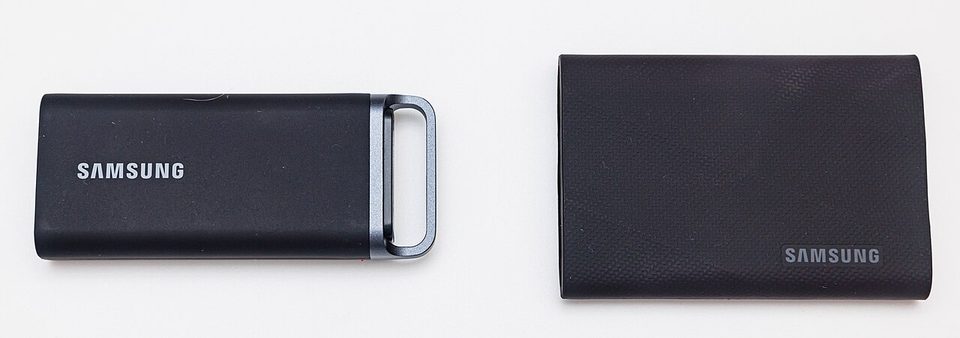
Every June the offsite drive rotates into a fire safe at my parents' house on the west side, because hurricane season starts whether your backups are ready or not, and the drive that has done that job for the last two years is a Samsung T9. It travels in a padded sleeve inside the same dry bag as the water filters and the radio, and on the night I actually walked it over, ahead of a storm that turned out to be nothing, the walk was eleven minutes and the copy took three. Those two numbers are the whole review, and only one of them is the drive's fault.
Plainly, since the rules require it: this is not a purchase recommendation, and I paid for the 4TB unit myself, after talking myself out of the 2TB for a week.
the part everyone gets wrong
The T9 is sold on 20 Gbps, USB 3.2 Gen 2x2, up to 2,000 MB/s, and the number is real. It is also a number most owners will never see, because the port it requires shipped mainly on high-end desktop boards and a slice of laptops, and most machines people plug things into are 10 Gbps at best, 5 Gbps commonly. On a 10 Gbps port the same drive runs at roughly half the headline. On 5 Gbps, a quarter. The drive is fine in every case. The spec sheet reads like a promise the USB port makes, and the port was never asked.
The second wrong thing is treating "portable SSD" as a category with real differences inside it. Inside every one of these is roughly the same thing: NVMe flash behind a USB bridge chip in an aluminum or silicone coat. What separates a good one from a bad one is sustained speed under heat, drop survival, and the software story. Those three, in that order.
the mechanics
Physically it's a rounded rectangle wrapped in grippy silicone over metal, rated for 3-meter drops, sized to disappear into a bag pocket. Capacities run 1, 2, and 4TB. Inside is TLC NAND behind a bridge chip that exposes the drive as a standard USB mass-storage device, no drivers, no vendor lock-in at the file level. Sequential reads approach 2,000 MB/s on Gen 2x2 hardware, and long writes settle well under that once the flash and the enclosure warm up, which is the number that matters for the video project nobody warns you about.
Security is where the T9 is more interesting than the average portable drive. It carries 256-bit AES hardware encryption, with password protection configured through Samsung's Magician software. Turn it on and the drive holds its key internally; the password gates the unlock. The catch is that the key management lives in Magician and the drive's firmware, and a forgotten password means the data is gone, because there's no back door, which is the correct design and also the one that eats people. The alternative, and my actual practice: the drive runs unencrypted, and what travels is an encrypted archive I created myself, so the encryption follows the files, not the device.
Telemetry, since I always get asked: the drive has no radio, no account, and no network stack. It phones home about nothing. Magician on a desktop checks for firmware and drive health, and the firmware it flashes is opaque like every other storage firmware. The attack surface I actually think about: this is a USB device you will plug into machines that aren't yours, and its bridge chip firmware is as unauditable as the category gets. That's true of every portable SSD on the market. The practical mitigation is boring: don't plug untrusted storage into machines that matter, and don't let your backup drive become the thing you found in a parking lot.
where it breaks
The port mismatch is the first break, and it's the one that generates the angry reviews. A buyer with a 5 Gbps laptop sees "up to 2,000 MB/s," runs a test, gets 450, and decides the drive is defective. The drive is doing what the port allows. My own laptop is 10 Gbps, so my real-world number is about a third of the sticker, and the copy that took three minutes in the opening would take nine on a 5 Gbps machine. Speed you can't reach is a spec you paid for, and the honest purchase decision is to buy for the ports you have.
Heat is the second. The silicone wrap is nice in the hand and mediocre at moving heat, so an hour-long transfer turns the enclosure into something you set down, and the drive throttles to protect the flash. It recovers. But the sustained number on a long write is meaningfully below the burst number, and if your work is one giant export every evening, plan around the marathon number, not the sprint.
The third break is the forgotten-password failure mode. Hardware encryption with no recovery path is the right security call and a brutal operational one, and I've watched exactly one person lock themselves out of a T7 and lose a semester of footage. If you enable it, the password goes on paper in two places, because paper doesn't have a firmware update cycle.
My admission: I bought the 4TB because the 2TB was out of stock on the day I decided I needed it, and a year later the drive is a bit more than half full. The capacity premium I paid bought me peace of mind I didn't need and will use eventually, which is the most honest description of a backup purchase ever written.
what to do
- Check your ports before you pay for speed. If the machine tops out at 10 Gbps, buy the cheaper 10 Gbps drive and pocket the difference.
- If you encrypt it, write the password down in two physical places the same day. A backup locked by a password that lives only in your head is a time capsule, not a backup.
- Use it as the rotating copy, not the only copy. My rotation is three drives and one offsite, and the T9 is the courier. Backups are not real until you have restored from them, so restore a folder from it quarterly.
- Skip Magician unless you need firmware or the hardware encryption. For plain file work, the drive is a dumb, honest block device, and that's a compliment.
- Log the serial number somewhere that isn't the drive. Insurance claims and RMA forms both ask, and the sticker is on the thing that just died.
The C-to-A cable in the box's molded tray has never been unwound, on any of my machines, and it still has the factory crease. I keep telling myself it's for the old tower. The old tower has been gone since 2023.
Check your port speed tonight. It takes thirty seconds and it decides what this drive is worth to you.