Nicholas TongFramework Laptop 13
17 / 46
Framework Laptop 13: the repair path is the product
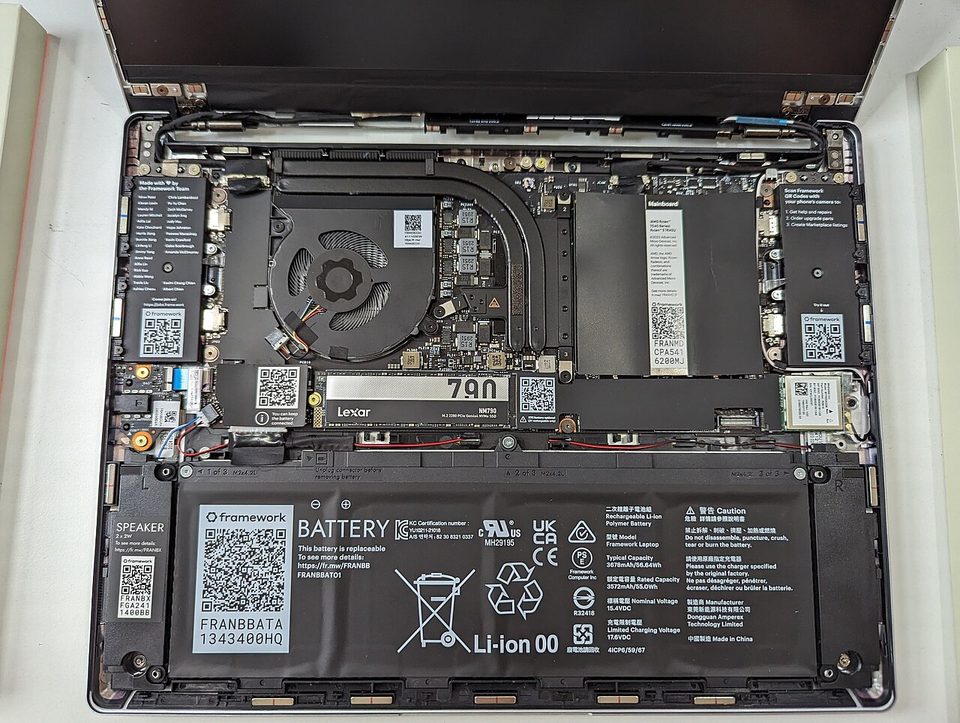
Twenty-two screws, one stripped, and the whole thing lay open on my kitchen table at 9pm on a Tuesday: the old mainboard out, the new one in, a cooler of the exact same dimensions as before. A 2.5mm hex driver rolled under the couch halfway through and I finished the last four screws with the driver from a pair of eyeglasses, which is the most Framework sentence I can type. The swap took 22 minutes. The old board went into a Cooler Master case the following weekend and became a home server, and that detail, not the spec sheet, is the product review.
Plainly, since the rules require it: this is not a purchase recommendation, and I paid for the laptop and the new mainboard myself.
the part everyone gets wrong
The default comparison is spec per dollar against a MacBook or a ThinkPad, and by that axis Framework loses on price and battery and usually on screen. People conclude it's a hobbyist tax. I made the same argument in comments until I owned one.
Here's the thing. The product isn't the laptop. The product is the parts catalog and the repair path, and the right way to price it is fleet math, not launch math. I spent six years at an MSP where the answer to a cracked hinge or a dead USB-C board was "the machine is out of warranty, get a quote for a new one," and the quote was always the answer because nobody could source a hinge for a 2-year-old consumer laptop. That's not a spec problem. That's a designed retirement. Framework publishes QR-code repair guides inside the machine itself, sells every component individually, and keeps mainboards from 2021 that still fit the 2026 chassis. Tom's Hardware's April 2025 review of the AMD generation praised exactly that continuity while noting the design is aging, and both halves of that sentence are true at once.
The second wrong read is that repairable means fragile. My 13 has crossed three flights, one hurricane-season evacuation box, and a floor incident. The aluminum chassis is no flexier than anything else in the class.
the mechanics
The shape: a 13.5-inch 3:2 screen at 2880x1920, four Expansion Card slots, two each side, and inside it a swappable mainboard, SO-DIMM RAM you can pull with a fingernail, a battery, keyboard, input cover, speakers, and webcam, all individually replaceable. The Expansion Cards are the signature piece: USB-C, USB-A, HDMI, DisplayPort, microSD, storage, each a little cartridge with its own controller and firmware, hot-swappable.
The 2025 hardware generation runs Ryzen AI 300-series or Intel Core Ultra boards, Wi-Fi 7, and the same 9.2MP 1080p webcam sensor as the year before. Battery on the AMD board is finally competitive, a full workday under my real load, which is terminals and a browser with too many tabs and the VPN client that never sleeps.
Firmware is where I actually pay attention. Framework publishes repair documentation publicly, documents flashing and recovery, and for the Intel mainboards they've shipped coreboot images as an open-source alternative BIOS. The AMD boards don't have that yet, and I say that as a limitation I accepted, because my board is AMD. The honest description is that Framework is the only laptop vendor whose firmware story you can describe to a colleague in one sentence, and that sentence is "they publish it."
On the machine I run Fedora, officially supported, suspend works, and the kernel picks up the hardware without a custom repo, which was true on the 2023 AMD board and true on the 2025 one. Every Expansion Card is a tiny computer with its own firmware, which is attack surface you install by choice, and I keep two slots empty by default. Ports you don't have are controllers you don't have to trust.
Telemetry: Framework collects nothing that I've found, and the marketplace and support flows are account-scoped like any store. Windows is available preinstalled if you want it, and Windows phones home per Microsoft's terms, which is a decision about the OS, not this chassis.
where it breaks
The honest list, from two years of daily use and one mainboard swap:
- Speakers are the worst part of the machine. They got retuned in 2025 and still lack the bottom end that the same money buys elsewhere. On calls it doesn't matter. For music it does.
- The chassis is the 2023 design with better guts, and it looks it. The bezels and hinge are unchanged, and a new buyer this year is buying a five-year-old silhouette with new silicon in it.
- Spare-part economics can bite. A mainboard costs most of a budget laptop, which Ars Technica's July 2026 review of the Laptop 13 Pro made the centerpiece of its price complaint. Upgrading is cheaper than replacing, not cheap.
- Community disappointment threads exist, and some of them are fair. The 2023 AMD board's early battery life and suspend behavior genuinely let people down, and the current generation is the first one I'd call settled.
- The stripped screw was mine. The repair guides tell you to use a screwdriver with actual grip and I used the wrong one, and a $10 driver error cost 40 minutes. My admission: I've done that twice on this machine, and the second time only because I was hurrying, which is the entire risk model of self-repair in one sentence.
what to do
- Buy the DIY edition and install RAM and storage yourself. It's the cheapest configuration and it teaches you the disassembly you'll eventually need.
- Buy the two spares you'd actually need, an input cover and a battery, and no more. A parts drawer full of spares for machines you own is thrift. For machines you don't, it's anxiety with a credit card.
- Put Linux on it if you're technical, Fedora or Ubuntu, and the expansion cards you actually use. Leave the other slots empty. Attack surface you install on purpose is the only kind you can reason about.
- On Intel boards, look at the coreboot image before you decide the stock BIOS is fine. On AMD, accept it and watch the changelogs.
- When you upgrade the mainboard, don't sell it. Put it in the case, give it one job, and let the old machine become the new server. The depreciation story is the reason this laptop makes financial sense at all.
The eyeglasses driver lives in the laptop's shipping box now, on purpose, next to the T6 and T5 bits it outranks, and the QR code inside the memory bay has sent me to the same guide three times and I have needed it three times.
Buy the screwdriver first. It's the cheapest part of owning this machine and the only part nobody remembers.