Nicholas TongRaspberry Pi 5
14 / 46
Raspberry Pi 5: the hobby board grew a datacenter problem
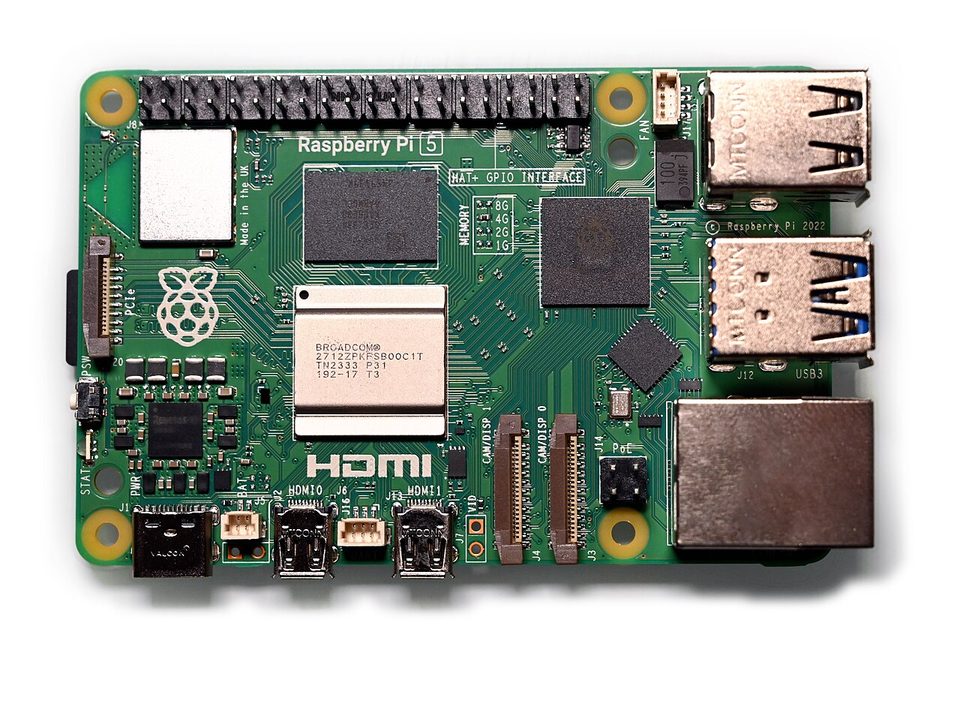
The thermal warning appeared forty seconds into the first boot, in a codebase I didn't write, on a board sitting on my desk in a room the air conditioner considers optional. Forty seconds. No case, no fan, ambient Houston in September. The Pi 4 had run the same workload for two years without ever mentioning temperature, and the new board, which Tom's Hardware called a new standard for makers in October 2023, had informed me of its feelings before it finished mine.
the part everyone gets wrong
People buy the Pi 5 as a cheap computer and review it as a speed bump. Both framings miss the thing I care about, which is that the Pi 5 crossed the power line between appliance and appliance-with-thermal-design. The Broadcom BCM2712 runs a quad-core Cortex-A76 at 2.4GHz, and to get roughly double the Pi 4's real throughput, the board can pull north of 10 watts under load. Ten watts in a credit card sized enclosure without airflow is a heat problem you now own. The 27-watt official supply isn't padding, it's the board telling you what it wants when peripherals attach.
The other wrong read is "it's just $60 or $80." That's the board. The board is never the build. By the time you have a power supply, a case, storage that isn't an SD card wearing out, and the active cooler the board is asking for, a "cheap computer" is a $130 project, and the honest comparison stops being an old laptop and becomes a used mini PC. I'll get to that, because it's the argument I keep having with myself.
the mechanics
The parts that matter for anything I'd run: 4GB or 8GB of LPDDR4X, and later 2GB and 16GB SKUs at $50 and $120. Two 4K60 display outputs. USB 3. A gigabit Ethernet port. A PCIe 2.0 x4 lane on an FFC connector, which is the quiet revolution here: with the M.2 HAT, you can boot an NVMe drive instead of an SD card, and SD card wear, the thing that quietly murdered every long-running Pi project of the previous decade, stops being your failure mode. My fileserver Pi has been NVMe-booted for over a year and the difference isn't speed, it's that I stopped thinking about the card.
There's an RTC with a battery header, so the board keeps time without network. The RP1 southbridge took the I/O off the main SoC, which is why USB behaves under load now. And the boot EEPROM can be locked: rpi-eeprom-config lets you disable SD boot entirely and require signed boot images, which is more secure-boot than most people realize the board supports.
Security posture, since this is where I always start: a Pi is a full Linux machine with an SSH daemon, and the community image you downloaded at 1am has the same attack surface as any other unmanaged box on your LAN. The vendor ships no telemetry that I've found, and the OS images are community-built, which is a trust decision you're making every time you flash one. I read the image build scripts for anything that runs exposed, which costs an evening and has caught exactly one thing, a container that phoned a stats endpoint I hadn't agreed to.
where it breaks
Power delivery is the first break, and it's dull and absolute. Undervoltage warnings under load, peripherals that work alone and brown out together, supplies that were fine on a Pi 4 silently failing the negotiation. If your board reboots when a USB drive spins up, it's the supply, and no amount of configuration fixes physics.
Thermals are the second. Without the active cooler, sustained load throttles. With it, the board is fine and the fan is audible in a quiet room, a small whine that I stopped hearing after a week and that guests always ask about. Passive cases exist and work, mostly, at the cost of turning the whole enclosure into a heatsink that shouldn't be touched after an hour.
The third break is the one I want to be careful about, because I've watched it happen to friends: a Pi that becomes load-bearing. It starts as a Pi-hole, then DNS, then a dashboard, then one day the network's name resolution depends on a $80 board with an SD card in a drawer's worth of airflow. The board is honest about being a hobby product. The failure mode is assigning it production trust without production practices. No ECC, no IPMI, no remote power cycle, and when it hangs at 3am you drive to it, which in my case is eleven minutes, and I've made that drive.
The price reality check, since I promised it: a used ThinkPad or a mini PC with a proper x86 chip costs about the same as a built-out Pi 5, draws more power, and gives you a real CPU, real RAM ceiling, and an ecosystem where the software is written for it first. The Pi wins on GPIO, on community projects that assume it, on idle power, and on the fact that when it eventually dies, it's $80 and an evening. My admission: I have three of them, and one does nothing but serve a dashboard nobody has opened since June. I know exactly which one. I keep it because turning it off feels like admitting something.
what to do
- Buy the official 27W supply and the active cooler. Skip both and you'll spend the difference in debug hours, which is the currency this hobby actually runs on.
- Boot from NVMe via the M.2 HAT if the thing needs to survive months, not days. SD cards are for reimaging, not for uptime.
- Lock the boot: SD boot off, SSH keys on, default password gone, and treat every community image as untrusted until you've read what its services phone home to.
- Decide its job in writing. One sentence, taped to the case if you have to. A Pi with a defined job stays maintained. A Pi without one becomes a shelf appliance.
- Put anything the household depends on behind a health check that pages you, and keep a spare on the shelf. The spare is $80. The outage is a Sunday.
The dashboard Pi's hostname is bayou-2, because the first one was bayou-1, and I have never renamed a Pi in my life, because the names have started to feel load-bearing too.
Give it one job and a spare. Then stop checking on it every week.