Nicholas TongKeychron Q3 mechanical keyboard
35 / 46
Keychron Q3: the keyboard that doesn't phone home
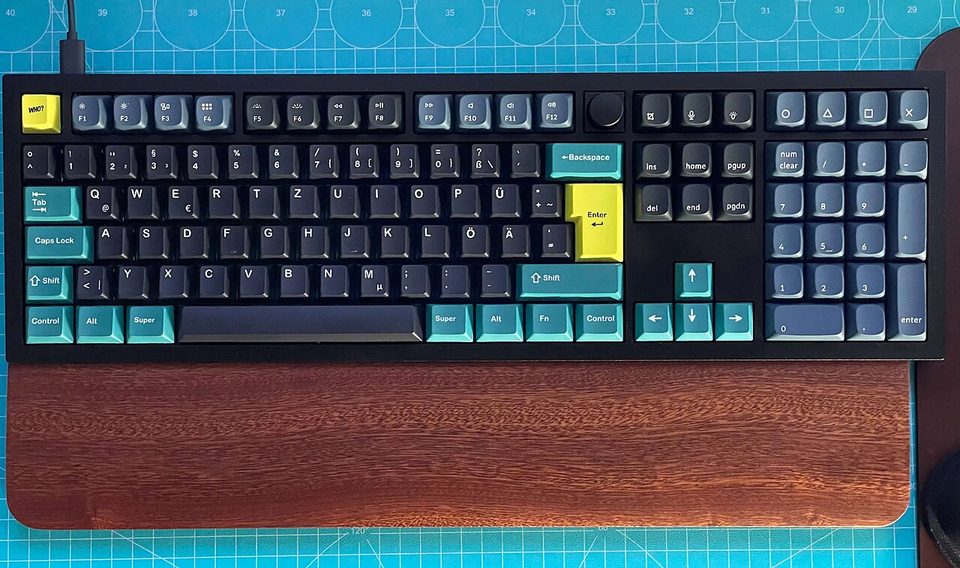
Three months into owning this keyboard, a coworker zoomed in on my screen during a demo and photographed my backspace key, because it doesn't say backspace. It says "backs pace," with a space in the middle, a misprint that shipped on a run of these boards and lived on my desk, in meetings, in front of clients, until someone finally noticed. I had typed on that key every day for a quarter of a year and never once looked at it. That's the review in miniature: the Q3 is excellent hardware with small-company QA, and both halves deserve sentences.
The hardware: a tenkeyless aluminum board, CNC-milled and anodized, gasket-mounted, hot-swappable, with sound-dampening foam, screw-in stabilizers, double-shot PBT keycaps, and a rotary knob on the top right that Tom's Hardware's April 2022 review called awkwardly placed and I call the part I use forty times an hour. It launched at $154 barebones or $184 assembled, and the line has grown since: a wireless Q3 Max with the same open firmware sits around $210 street, an HE hall-effect version and an 8K Ultra variant followed, and the original wired Q3 keeps turning up discounted. The board weighs more than some laptops. Picking it up is a two-handed decision, and I mean that as a compliment.
the part everyone gets wrong
The wrong read is that this is a hobby purchase, a toy for people who have opinions about foam. I understand where that read comes from, and it's wrong in a specific direction. A keyboard is the one device on your desk that receives every password, every API token, every argument with your manager. Most of the market's answer is a board that runs closed firmware configured by a cloud-adjacent vendor daemon. The Q3's answer is QMK and VIA, open-source firmware that executes on the board itself, with configuration that happens on your machine and never leaves it.
I want to be careful here, because I don't want to claim the alternative is malicious. It isn't. It's unauditable, which is different, and the difference is the point. With QMK I can read the firmware source, compile it, and flash exactly that. Key logging by a keyboard is a real category of attack; the defense is knowing what your keyboard runs. The Q3 is also wired-only, which removes the radio entirely, and the VIA app talks to the board over a browser permission prompt rather than a background service with an account. That prompt, WebHID, is worth noticing the first time it appears: it is the one doorway between a web page and your keyboard, and the Q3's whole model funnels everything through it instead of a dozen silent channels.
the mechanics
A gasket-mounted board floats its plate on foam strips inside the case, so each keystroke lands on a little suspension instead of ringing through aluminum to your desk. It's why enthusiasts care, and it's the difference between a board that sounds like a doorbell and one that sounds like a soft knock. The Q3's execution of it is real but imperfect, and I'll get there. Under the keycaps, the hot-swap sockets mean a failed switch is a thirty-second pull with a $3 tool, no soldering, which is the single feature that makes this a ten-year keyboard instead of a two-year one.
The knob is a rotary encoder you bind in VIA: volume on my machine, screen brightness on the test one, and it detents with a feel expensive enough that other people pick the board up just to turn it. VIA itself runs in a browser, lists the board, and edits the layout live; the mappings write to the keyboard's memory, not to a profile in the cloud. Unplug it from the work laptop, plug it into the personal machine, and the board is the same board. There's no sync to review, because there's no sync.
The build is the part reviewers agree on. How-To Geek called the keystrokes immaculate and the chassis flawless; the board ships with a wooden wrist rest, four grippy feet, and, in the Max generation, spare screws for the ones you'll strip, which is the kind of detail that tells you someone at the factory lost a Saturday to a stripped screw once and never again.
where it breaks
Sound is the first break, and Tom's Hardware put it plainly: the steel plate is heavy, the typing feel is stiffer than the gasket marketing implies, and the stock sound is hollow rather than deep. My unit pinged on a couple of keys until I cut a strip of shelf-liner foam and laid it under the plate, a ten-minute mod that cost a dollar and fixed the ping, and the hollowness never fully left. The honest version: the Q3's sound is a 7 out of 10 that modders push to 9, and Keychron has spent the years since fixing exactly this in the Max and Ultra revisions, which is its own admission.
Keycaps are the second break, and the "backs pace" key is only the visible one. The legends are thin and the printing is inconsistent, on boards that otherwise justify their price, and it's the reason half the community ends up buying a set of keycaps that costs a third of the keyboard again. I typed on mine for months before replacing them, and I'll admit the replacement set cost more than the wrist rest, the foam, and the puller combined.
Then the small ones. The feet don't adjust, one fixed angle, and the board is tall enough that tall keycaps won't fit under a monitor riser, which a Q3 Ultra reviewer learned mid-review. The knob sits close enough to escape to bump it while reaching for arrow keys, and my volume has jumped during two demos that I know about. And the wired-only design that I praise as a security feature is a dealbreaker if you want a clean desk, in which case the Max exists and costs more.
what to do
- Buy it for the firmware, not the foam. If QMK/VIA and a wired-only board don't move you, this is the wrong product and there's no shame in that.
- Budget for a mod: foam under the plate, and probably keycaps. Call it $60 extra and the board stops sounding like the price.
- Read that browser permission when VIA asks. It's the single channel into your keyboard. Grant it to the app you use, not to whatever page is open.
- Flash firmware deliberately, from source you looked at, and keep a copy of the working build. QMK makes downgrades easy, which makes experiments cheap.
- Hot-swap sockets are the warranty. A flaky switch is a pull, not a board. Buy the tool the same day as the keyboard.
The misprinted backspace went to a drawer when I recapped the board, and I kept it, because it's the most honest part in the box: a factory that missed something small inside a thing built almost perfectly. The board still weighs a suspicious amount and still doesn't talk to anything but the cable.
It has never once tried to update itself. I check the firmware the way I'd check a lock, on purpose, with the source open.