Ryan CobblerMac mini (M4)
My ThinkPad retired and a five-hundred-dollar box took the desk
The ThinkPad I learned to code on is a 2016 model with a battery that holds eleven minutes and a fan that sounds like a shop vac. It ran my invoices, my builds, and every client project for four years. In April it finally refused to wake up, and I had a choice. I could buy the Windows tower I'd been eyeing at $900, or I could try the little Mac everyone kept telling me about.
I bought the base Mac mini with the M4 chip for $499 and kept $400. Three months on, it has replaced the ThinkPad completely, and I'm writing this on it. I'll be honest. I expected to return it.
What it costs, what you get
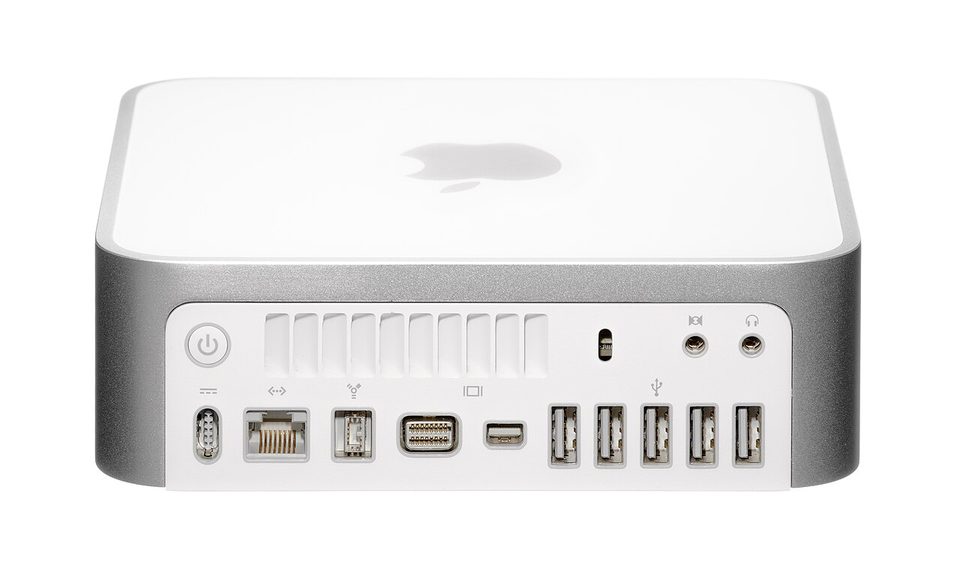
The base model is $499 for 16GB of memory and a 256GB drive. The M4 Pro version starts at $1,299 and that's where I'd stop reading if you're a five-person office, because the base chip is already more than a small business needs. Reviewers keep calling it the best mini PC available right now, and the praise lands on three things: the size, the quiet, and the ports. Two USB-C and a headphone jack on the front, which sounds like nothing until you're plugging in a card reader every morning.
You cannot upgrade anything inside it. Memory and storage are soldered at the factory. Whatever you buy is what it is forever, so buy the memory you'll need in year three, not the one you need today. The power button lives on the bottom, which reviewers complain about, and it is a dumb place for a button. Mine sits on a shelf where I reach it once a week.
The drive is the one decision that matters. 256GB fills fast with real work files. I solved it the cheap way: a $59 portable SSD on the desk holds the client archives, and the internal drive stays for apps. That trick keeps the bill under $560 and sidesteps Apple's storage pricing, which is the most expensive part of every Apple purchase.
How I set up my desk
- Bought the base M4, $499, plus the $59 external SSD for client files. Total $558, and the ThinkPad went to the shelf it earned.
- Moved my working files over in one evening. The tools I run, mostly text editors, file transfers, and a browser with a suspicious number of tabs, moved without a single setup headache.
- Put the mini on the shelf under the monitor. It's smaller than the cable box. The desk came back.
- Set up automatic backups to that external drive before I moved anything else. New machine day is backup day, not an optional extra.
- Left the fan's schedule alone. Three months in, I've heard it twice, both times during a full backup.
The honest gripes, because there are some: it's still Apple, so you're inside their walls for apps, and if your business software is Windows-only, this box doesn't change that. Check your software list before you fall in love. And the cooling is tuned for quiet, which means a long overnight export runs the fan you'll finally hear. That's it. Those are the complaints.
The mini-split version
The M4 mini is a mini-split heat pump. One small outdoor cabinet, no ductwork, and it heats and cools a floor of a building that used to need a basement boiler and a chimney. Everybody who walks in asks where the furnace is.
It does the job of machines three times its size because the chip sips power instead of drinking it. The old ThinkPad pulled a couple hundred watts under load and still crawled. This thing sips tens of watts and doesn't crawl. On a $200 electricity year for a shop, that's not poetry, that's the bill. And like the mini-split, there's nothing to service inside. You install it and forget it exists, which for a desk machine is the whole point.
What to do Monday
Write down the five programs your desk machine actually runs, tonight, on paper. If none of them require Windows, price the base Mac mini plus a portable SSD and compare it to whatever tower you were about to buy. If one of them requires Windows, stop right there and buy the boring Dell from my last post instead. The machine only wins if it runs your work.