Nicholas TongZimaBoard 832 single-board server
20 / 46
ZimaBoard 832: it wants to be your firewall, and it shouldn't be
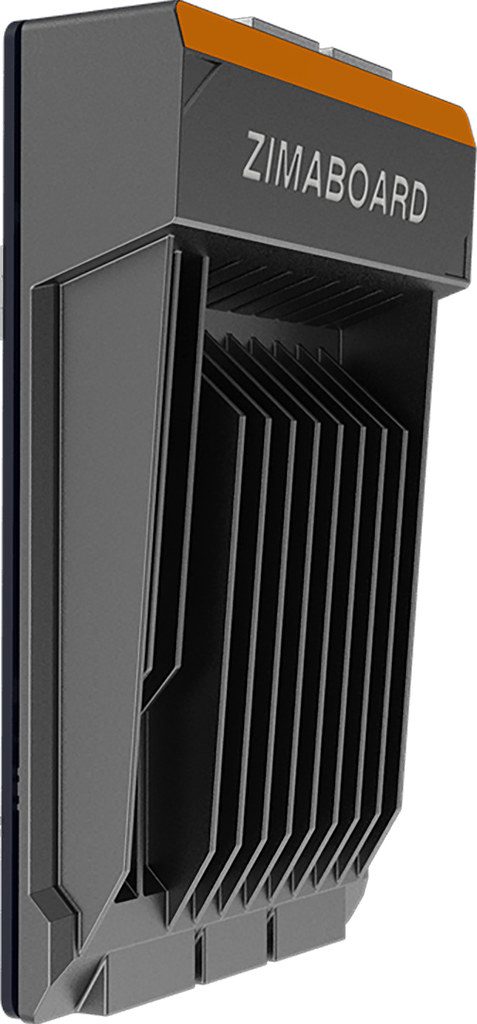
There's a white LED on the edge of this board that shines on the wall behind my desk, all night, every night, and I only found out at 2am during a thunderstorm, when the power blinked and every other light in the room died except that one. The 832 was the last machine in the house still awake, six watts, fanless, quietly noting that the storm happened. That's the actual product here. Most of the marketing is doing its best to cover it up.
What you're buying is a 138 by 81 millimeter slab of finned aluminum with a quad-core Intel Celeron N3450 inside, 8GB of soldered LPDDR4, 32GB of eMMC, two SATA ports, two gigabit Ethernet ports, one PCIe x4 slot, and a mini DisplayPort, cooled by nothing at all. It launched around $199 and it's sat at $229.99 on Amazon for most of its life. MBReviews spent 2023 with one and got 15.8 GFLOPS out of Linpack, which is roughly what the price predicts. I paid for mine myself and it has run nearly continuously for two years, and my meter says single-digit watts at idle with the drives asleep.
Plainly, since the listing won't say it: this is not a firewall.
the part everyone gets wrong
Seeed's own product title is a list of promises, and pfsense and "high-security traffic" are in it, twice if you count the implied one. So people buy this box to be their perimeter, and that's the wrong read. The N3450 is a 2016 Apollo Lake part. It will NAT at gigabit line rate all day and never complain. Put Suricata on it with a ruleset at gigabit and it will fall over, because deep packet inspection is a CPU problem and this CPU stopped being current before this board existed. The PCIe slot can take a better NIC. It cannot take a better CPU, because the CPU is soldered.
The thing the marketing gets almost right by accident is the slot budget. Two real SATA ports, dual onboard NICs, an open PCIe x4 edge, all drawing single-digit watts and silent, at two hundredish dollars. SlashGear's review called it versatile but expensive, and I'd amend that: it's expensive against a Raspberry Pi and cheap against everything that has this many real expansion interfaces. The Pi makes you hang storage off USB bridges. This board gives you the ports the job actually needs. That's the entire reason it exists, and every glowing unboxing video of the CasaOS dashboard is a way of not saying it.
the mechanics
CasaOS ships preinstalled on the eMMC, and it's a Docker dashboard with an app store: Pi-hole, Jellyfin, qBittorrent, Syncthing, a UniFi controller, about forty others. The setup wizard makes you create an account, then the panel lives on your LAN on port 80 and waits. It's a web application holding root over your container runtime, and I want to be careful here, because I don't think CasaOS is doing anything wrong. I think it's doing exactly what a web panel does, which is listen. Treat it like any other panel: LAN-only, never port-forwarded, reached over Tailscale if I'm on the road, which is how mine has been reached since the first month.
The slot geography is the part worth learning. Two gigabit ports and two USB 3.0 ports along the top, power on the right, mini-DP on the left next to the open PCIe x4 slot (the vendor's table says generation 2, so call it a 2 GB/s ceiling; enough for a 2.5GbE NIC or a SATA controller, not enough to care about for anything faster). Along the bottom are the two SATA 3.0 ports and a single SATA power connector, which matters later. The eMMC boots the OS so the SATA pair is free for data. Idle draw is single-digit watts, sustained under load maybe ten, and there is no fan anywhere, which is both the charm and the problem.
MBReviews also found the PCIe slot happily took WiFi cards, then spent an evening discovering OpenWRT had no firmware for the first one and unstable support for the second, which matches my experience with the slot: it works, and everything after "it works" is you and a forum thread.
where it breaks
The first break is sustained load. Passive cooling on a 6-watt TDP is fine for services that idle, and MBReviews watched Geekbench 6 fail outright and the case go hot to the touch under a longer benchmark. Mine has never throttled, because I've never asked it to do anything for more than thirty seconds at a stretch, which is by design and also a confession about what this box is for.
The second break is quality control and support, and this is a small company, so take it seriously: MBReviews' first board froze within minutes and had to be replaced. Mine arrived fine, but the RMA path is email with a vendor of maybe two dozen people, and when a board with soldered RAM dies, the board is done. There's no DIMM slot to reseat and no warranty culture to lean on. For a homelab toy that's an acceptable bet. For anything a business might depend on, it isn't.
The third break is that single SATA power connector. Two data ports, one power port, so two drives means a Y-adapter, and a two-dollar Molex splitter feeding a machine that runs 24/7 unattended in a closet is exactly the kind of bargain I've stopped making. One drive on this board. If the job needs two, the job needs a different board.
The fourth break is time. The 832's silicon was old at launch and it's a decade old now, IceWhale has a ZimaBoard 2 out with an N150 and DDR5, and at $229.99 new the 832 only makes sense used or on clearance. My admission: I bought mine to run pfsense, because the listing told me to, and kept it as my edge for five weeks. The afternoon I enabled IDS on it, throughput fell off a cliff and my own laptop's traffic started dropping during a storm. Moving it inside the VLAN cost me a Sunday and a re-crimped cable, and it has been the most reliable machine I own ever since, doing DNS and a small pile of containers behind the firewall that actually has the muscle for the job.
what to do
- If you already have one, let it be what it's good at: DNS, VPN termination behind your real router, containers, storage for two or three people. Don't let it be the thing the internet touches first.
- Wipe CasaOS if you don't need it, or keep the panel off the internet permanently and audit what the app store installs, because the store has churned before and every app in it is a container running as root on your box.
- Add the 2.5GbE NIC to the PCIe slot if your switch speaks it. That's the one upgrade the slot exists for.
- One drive, no Y-adapter, on a surge strip, and a backup that lives somewhere else, because the eMMC is the only boot device and it isn't replaceable in any way that matters.
- If you're buying new in 2026, look at the successor or a used thin client instead. The 832's price has outlived its specs.
The board sits on a shelf next to the water heater closet, doing the same five jobs it has done for two years, and the white LED still shines on the wall. My wife thinks it's a smoke detector indicator. I have stopped correcting her.
Get the silicone feet. It slides.