Nicholas TongHP EliteDesk 800 G4 mini as an OPNsense firewall box
22 / 46
the second computer hiding inside your firewall
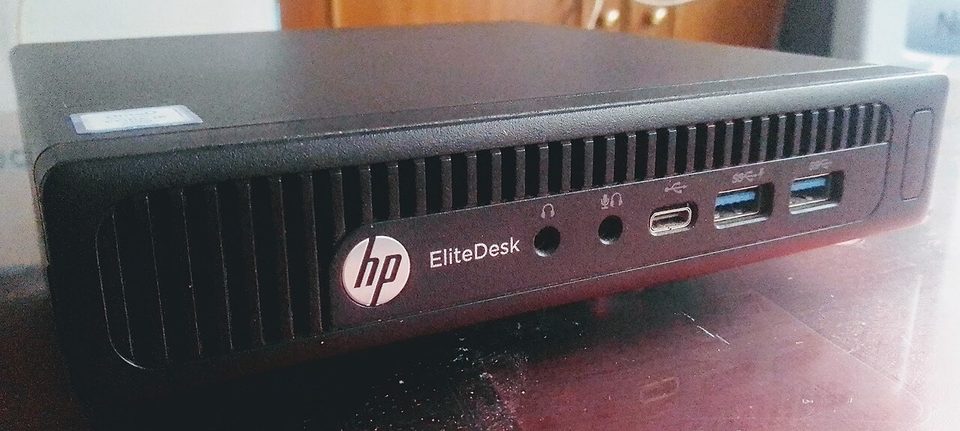
The machine was off. I know it was off because I had held the power button down until the fan stopped, and I was standing in front of it watching the light go dark. Then I ran nmap from my laptop and port 16992 answered. I ran it again. It answered again. A desktop with no operating system running had a TCP port open, and the banner said Intel.
That was the first hour of owning this firewall, before it was a firewall. The box is a refurbished HP EliteDesk 800 G4 Mini, the one-liter office desktop that accounting departments bought by the thousand around 2018, and it now runs OPNsense on my edge. I want to walk through why I bought a decommissioned office computer for the most important job in my house, because the reasons are better than they sound, and the port 16992 thing is the exact reason most people should stop and think first.
the part everyone gets wrong
The standard advice is that you buy a purpose-built appliance for your firewall. That is defensible. I own one myself, a Protectli that cost $369, and I like it. But the used enterprise market has quietly made that advice mostly about taste instead of money. An EliteDesk 800 G4 Mini with an i5-8500T, 16GB of memory, and an SSD has been running $180 to $220 this fall from the big refurbishers, and it has six cores, three storage slots, and a metal chassis that will outlive me.
Six cores for a firewall is absurd. It is wonderful. OPNsense with Suricata and a dozen VLANs never asks the CPU for more than a third of what it has. The mistake is not in the hardware math. The mistake is in thinking refurbished means clean.
This machine had a first life. Somebody's IT department imaged it, tagged it, and managed it, and the management hooks do not vanish when the company's lease ends. That is what port 16992 was. Intel vPro ships with AMT, Intel Active Management Technology, a small management computer living in the chipset, reachable through the i219LM network controller. It can answer when the host is powered off. It is designed to. An IT admin in 2018 would have called that a feature, and they would have been right, for their fleet, on their network, under their control. On my network, in my house, it is a second computer I did not buy and did not configure, sitting between my cable modem and everything else.
the mechanics
The fix took about twenty minutes and one manual. HP's MEBx, the BIOS extension that configures AMT, lives behind Ctrl+P at boot. I went in, found AMT provisioned and set to always reachable, and turned the whole subsystem off, not just the network reachability. Then I did the thing I should have done first: I set my own MEBx password before disabling anything, because an unmanaged AMT with a known default credential is worse than a managed one.
After that, the build is boring in the good way. The 35W i5-8500T idles cool and the front-to-rear airflow in the small chassis means I can stack it under a shelf with the modem. OPNsense installed onto one of the two M.2 NVMe slots in under ten minutes. The onboard Intel i219LM gigabit port became my LAN interface, which is fitting: the same port that used to carry management traffic now carries my living room.
The second port was the real project, because a firewall needs at least two NICs and this machine ships with one. The classic answer is a USB gigabit adapter, and I did that first. I will get to why I undid it. The answer I settled on is an M.2 A+E key adapter with an Intel I226-V on it, about thirty dollars, sitting in the WiFi slot with the RJ45 jack passing out through the expansion hole at the back. People on the homelab forums have run this exact combination through 2026 and it behaves. It has for me. The machine sees it as a plain Intel NIC and OPNsense has nothing to say about it.
My VLAN layout survived the migration intact, which is the part I am proudest of, because it means the rules were written down somewhere other than my memory:
- LAN, trusted, the machines I work on
- IoT, cameras, television, and a thermostat with opinions
- Guest, throttled and logged, for when people visit
- Lab, a segment I break on purpose and rebuild without guilt
where it breaks
The USB adapter. Here is my confession, with specifics: I ran the WAN on a Realtek USB 3.0 gigabit adapter for about three weeks, and under load it wedged, twice, in a way that did not drop the interface but stopped moving packets, so my monitoring showed green while the internet was dead. Realtek support in BSD is the textbook reason people say buy Intel NICs, and I had read that, and I bought the adapter anyway because it was ten dollars and I was impatient. That is the whole story of most homelab outages, including mine.
Other honest limits. The onboard port is gigabit and that is all you get without an adapter, so if your plan is 2.5 gigabit or faster, add the twenty to thirty dollars or stay at gigabit on purpose. The second NVMe slot and the 2.5 inch drive tray fight each other for space, which matters not at all for a firewall and entirely if you bought this as a mini server. The machine has a sticker from its previous employer still on the top, an asset tag from a copy room that no longer exists, and I left it there. The thermal headroom is fine but not generous; the fan spins up when Suricata is busy and the closet is closed. And a fleet desktop carries a history I cannot fully audit. I can reset the BIOS and kill AMT and overwrite the disk, but I cannot prove what firmware it ran for six years in a building I never entered.
what to do
If the shape of this appeals to you, the order of operations matters more than the parts:
- Buy the T-suffix CPU. The 35W versions cool properly in the small chassis. The 65W ones cook.
- Before anything else, enter MEBx, set your own password, then disable AMT entirely. Do it in that order.
- Fresh NVMe, fresh install, no trust in the previous tenant's disk.
- Second NIC: Intel, on the M.2 A+E adapter, or nothing. Skip the USB adapter. I paid for that lesson so you can skip it.
- Restore your config from backup once, on purpose, before you trust the box.
There is a version of this hobby where the answer is always buy the appliance, and there is a version where the answer is always use what exists. I have landed somewhere in the middle, which is where most security decisions actually live. The used desktop is the better deal by several hundred dollars, and it carries an attack surface no appliance does, in the form of a management engine designed by people who were not thinking about my house.
Check one machine tonight, whichever one faces the internet. Find out whether it has a management engine and what that engine can reach.
That is the homework. I did mine with a running nmap and a bad feeling.