Ryan CobblerBluehost WordPress hosting
Bluehost burned me. Here's how to use it without getting burned.
I got burned on this one, so let me save you the same bruise. Sal runs a plumbing outfit on the east side, one of my two plumbers. His site has lived on Bluehost since 2020. In January, Bluehost did some account migration on their end, and the DNS records reset. His office email went dead for two days. A plumbing company that lives on the phone lost its email over a weekend.
I fixed it myself, on a Sunday, with cold coffee. Two hours. But the lesson landed. Bluehost is cheap to start and easy to run until the day it isn't, and you have to know which day that is before you sign.
Listen. I'm not saying don't use them. I paid them for years, on my own first site and on Sal's. I'm saying go in with your eyes open, because the pricing has a trap in it and the checkout page has a shovel.
What it costs
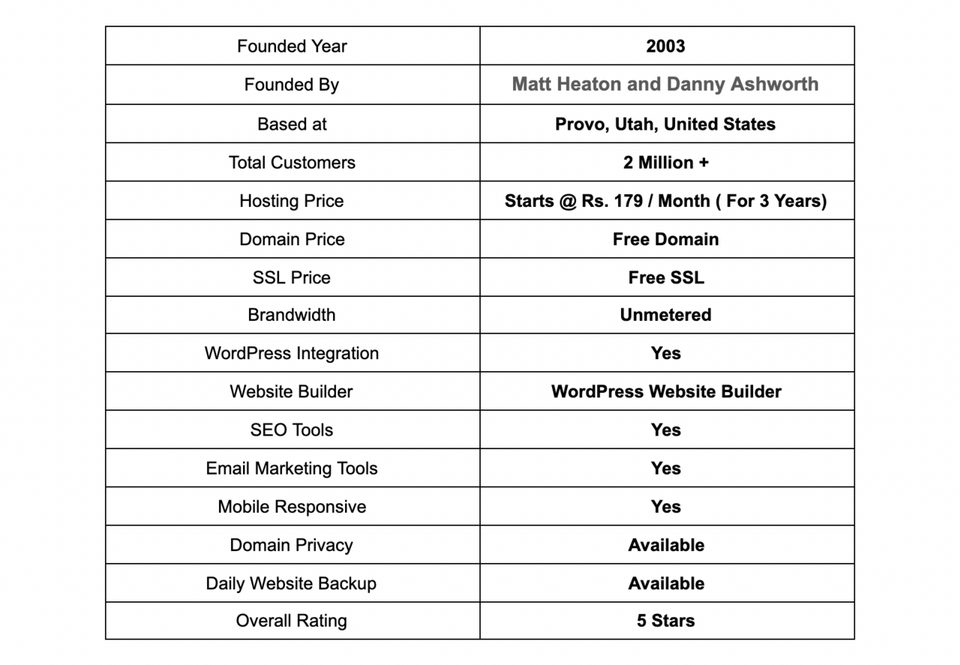
The WordPress Starter plan is $3.99 a month if you sign a 36-month contract, billed up front. About $144 the day you click buy. Then it renews at $9.99 a month, which is $120 a year. The 12-month option is $4.99 to start and renews at $11.99. Same trap, smaller numbers.
Free for the first year: the domain, the SSL certificate, a CDN, and weekly backups. Free forever: malware scans. That's a genuinely decent bundle. Budget for the renewal price, not the intro price, before you click anything. If $120 a year sounds bad on year two, this isn't your host.
The checkout page waves three add-ons at you, and Bluehost officially recommends all three. SiteLock Essentials, Codeguard backups, and Yoast SEO, about three bucks a month each. I bought Codeguard for Sal and skipped the rest. Thirty-six bucks a year for automatic restores, after a scare, felt like cheap insurance.
One more thing I learned the hard way. Phone support does not come with the cheapest plan. Chat is 24/7 on all plans. The phone number shows up on Business and above.
What works, what doesn't
The good stuff is real. WordPress itself recommends Bluehost officially, which is why every beginner ends up here. Installing WordPress is one click. The custom dashboard sits on top of standard cPanel, so nothing you learn there is wasted if you move later. Their tests show a US server response around half a second. Not the fastest. Fine for a plumber.
Trustpilot averages 4.6 from over 28,000 reviews. Reddit hates them. Both things are true at once, and I've lived the Reddit version. People complain about the upsells, the surprise renewals, and DNS resets exactly like Sal's. The parent company, Newfold, owns half the budget hosting industry, and it shows in the checkout maze.
Storage on the starter tier is 10GB. Ten. Fine for a service business with compressed photos. Tight for anyone selling anything. Their WooCommerce plan starts at $14.99 a month if you get there.
The apartment furnace version
Shared hosting is a furnace in an apartment building basement. One boiler, twelve units, everybody's radiators fed off it. Works great in September. On the first cold night, everyone cranks it and the guy on the third floor showers in lukewarm water.
Bluehost's starter plan is that boiler. Your site shares a machine with a few hundred strangers. Most nights you'll never notice. If a neighbor gets a traffic spike or runs something sloppy, you both feel it. When Sal's site needs to be fast at 6am on a burst pipe, "usually fine" is a different conversation.
How I'd run it now
- Sign the 36-month term for the cheap rate, then set a calendar alarm for the month before it ends. Decide before renewal, not after.
- Skip every pre-checked box at checkout. Buy the plan. Add-ons can be added later, inside the account, same prices.
- Turn on the free SSL and free CDN yourself in the portal. Takes ten minutes and costs nothing.
- Buy Codeguard if the site earns money. Skip it if the site is a brochure with your phone number on it.
- Download a full backup to your own hard drive the day the site launches. Don't store your only copy on the machine that can lose it.
I stopped paying Bluehost in the spring. Sal's site moved to another host, which I'll cover next, because I was tired of waiting for the third bad thing. Cost of the move: a Saturday afternoon and about forty dollars for a migration plugin I didn't end up needing.
What to do Monday
Open your hosting account right now and find your renewal date. If your intro rate ends in the next ninety days, write the renewal price on a sticky note and put it on your monitor. The bill should never surprise you twice.