Nicholas TongTP-Link TL-SG108E managed switch
43 / 46
the forty dollar switch that taught me VLANs are a habit, not a product
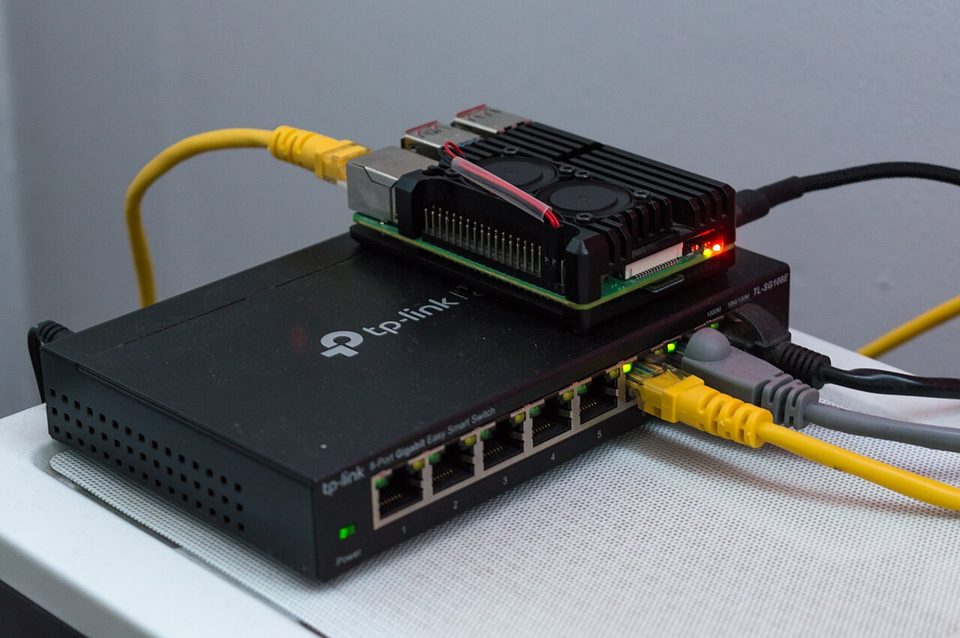
The first VLAN I ever built at home was built because a smart plug from a clearance bin at a store on Bellaire started talking to an IP range I could not explain at 3am, on a night I happened to be awake for the wrong reasons. I had a flat network, one subnet, everything trusted everything, the way most home networks are built by everyone including me. The fix cost $36. It was this switch. That was six years ago and the plug is long gone in a drawer, but the segmentation habit it bought me is still running on hardware that has never once failed.
Here's the thing. The TL-SG108E is not a good switch. It is a great $36 switch, and those are different claims that only look alike from across the room. For the price of two pizzas it gives you 802.1Q VLANs, port mirroring, loop prevention, and QoS queues you will never touch, on eight gigabit ports in a metal case that runs silent. It also gives you a management plane from 2013, and whether that matters depends entirely on where the box sits.
what it actually is
Eight gigabit ports, fanless, desktop or wall mount. Port-based and 802.1Q VLANs, capped at 32 of them, which sounds like a joke ceiling until you realize a home network with more than a handful of VLANs is usually a hobby wearing a network costume. Port mirroring, so you can feed a copy of the traffic to a Raspberry Pi running Zeek or just to Wireshark on a laptop, and that single feature is the reason I recommend this specific model over any unmanaged switch in the same price band. Static link aggregation if you want it, jumbo frames, IGMP snooping, per-port rate limiting. Current pricing hovers between $30 and $40 depending on the week and the store.
The management interface is the catch, and it is a real one. There is a web page, and it is bad. The supported path is a Windows utility that talks to the switch at layer 2, and community tools exist to do the same from Linux because people got tired of keeping a Windows VM alive for a thirty second task. The reviews that trash this switch are almost all reviews of that utility. They are correct. It is still the right trade at this price.
the part everyone gets wrong
People buy this switch expecting "managed" to mean "secure." It does not. Managed means the switch has an IP address, a management protocol, and a configuration you can get wrong, and every one of those is attack surface that an unmanaged switch does not have. The horror stories you read about this platform are mostly about the older firmware generation, where the management interface was reachable and the credentials were thin. TP-Link has shipped firmware updates over the years, but this is a budget product line and you should not model it as a device with a long security runway.
I want to be careful here, because I do not want to scare anyone off the box. The right mental model is: the switching silicon is fine, the management plane is the liability, and your job is to make the management plane unreachable. Do that and the scary part of the switch is gone. Skip that and you have put a device with a decade-old design lineage on the same LAN as your laptop.
the mechanics, in ops terms
The VLAN model on this switch is straightforward once it clicks. You create a VLAN, you assign untagged ports to it for the devices that live there, and you tag the uplink port that carries traffic to the router. That is it. My current build has the IoT junk on VLAN 30, the cameras on VLAN 40 with no internet route at all, and the trusted stuff on the native network, and the SG108E carries three of those down a single cable to the router. Thirty minutes of clicking, one evening, done for years.
Port mirroring is the underrated feature. Set one port as a mirror of the uplink, plug in a capture box, and suddenly you can see what your devices actually do instead of what the vendor's privacy page says they do. That is the whole pitch for doing network-based detection at home. You do not need an enterprise NDR platform. You need forty dollars and an afternoon, and you will find out that your TV calls home more than your laptop does.
where it breaks
The web UI breaks first, in the sense that it barely works in a modern browser, and if you have no Windows machine handy you will be hunting for a community tool. Budget one frustrated hour.
No STP worth trusting is the second break. The E-series does basic loop prevention, not real spanning tree, so if you ever plug this into another switch and create a loop, it will handle it badly or broadcast-storm your evening. Keep the topology flat and dumb: one uplink, one switch, no daisy chains.
The 32-VLAN ceiling and the absence of ACLs, LACP, and anything layer 3 are the third break, and they are the honest boundary of the product. The moment you need those, the answer is a used enterprise switch off eBay, which costs about the same and talks like a real switch. I ran an off-lease managed switch for two years. It was louder than the SG108E by an order of magnitude and I do not miss the fan.
And the management plane is the fourth break, and the one with consequences. Default credentials on any network device are a standing invitation, and a switch with an IP is a device an attacker can fingerprint, probe, and occasionally exploit from inside your network. CVE numbers are boring on purpose, and the boring rule here is: no IP on the untrusted VLANs, management on the trusted side only, or no management IP at all once the config is set.
what to do
- Buy it for the VLANs and the mirror port. Buy a different switch if you want a management love affair.
- Configure it from a machine on the trusted network, then change the password before anything else is plugged in.
- Decide on one of two end states: management VLAN only, or static config and the management interface shut off. The middle state, an always-on web page on the flat LAN, is the one that bites people.
- Put the IoT devices on their own VLAN with no route to the trusted one. This alone beats half the security products marketed at home users.
- Check firmware once a year, from the TP-Link support page directly, not from a link in an email.
One useless detail to close: the version sticker on mine says v4, and there is a coffee ring on the label from a mug I do not own anymore, set down on it during a config session in 2021. The ring outlasted the mug and, apparently, the switch's third power cycle of that month.
The admission I owe you is that I ran this switch wide open, management page reachable on the flat LAN, for almost two years, because it was mine and it was home and nothing bad happened. That is exactly how these stories always go, and nothing bad happening is not evidence. It is just a streak.
The flat network is the default because nobody assigns it. Assign it.