Nicholas TongSuricata
57 / 60
the alert that fires at breakfast
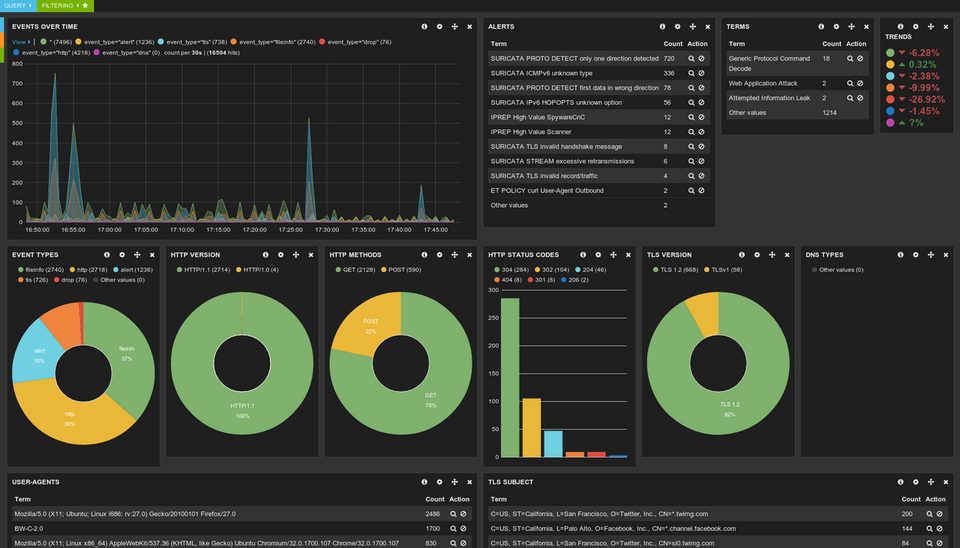
The alert that fired at 06:58 on a Tuesday in September was the kitchen tablet. A free scores app I installed during a World Cup argument had spent the night checking in with an analytics domain every ninety seconds, 214 contacts by the time I poured the coffee, and a rule in a volunteer-maintained ruleset caught every one of them. I stood there reading a JSON line about a tablet while the oatmeal went sideways, and that morning is the most honest summary of running an IDS at home I have: after two years, the interesting catches are my own devices misbehaving, and the intruder count is zero.
Suricata is the open source intrusion detection engine from the Open Information Security Foundation (OISF), a nonprofit, and it's at 8.0.7 as of a security release in September 2026. The software is free. The hardware is an Odroid H4 I already owned for other jobs, watching the home segment behind the Flint 2, the OpenWrt-based router I reviewed earlier this year. So the purchase conversation is over before it starts, and what's left costs hours.
the part everyone gets wrong
People put an IDS on a home network expecting it to catch hackers. What does it actually catch? Mostly your own house. My edge has no port forwards, so the scanners knock on the firewall all day and the sensor never sees them, because the knock never becomes a connection. What it watches instead is devices checking in: the TV, the thermostat, a laptop's sync client, the tablet. The firewall answers the scanners. The sensor watches what got past. Those are different jobs, and the second one is quiet.
The second mistake is assuming an IDS tells you the answer. It's a microphone. Suricata matches traffic against signatures written by people, and on week one it knows nothing about your living room. My first full night on the default Emerging Threats ruleset produced about 3,700 alerts, most of them one-directional UDP from a game console, which is a thing consoles do. The number wasn't proof of an attack. It was proof the microphone was on.
the build, with the mistake kept in
First attempt: I ran it inline, IPS mode on, drop rules enabled, full ruleset, because if alerts are good then blocking is better, right. Within an hour the drops had eaten the TV's firmware check and half the house's DNS replies timed out during a work call. The TV stayed on its manufacturer's loading screen for twenty minutes, and the TV is the household's canary, so I heard about it at full volume. That box came out of the inline path that evening and went back to being a sensor. IDS first, IPS later, and only on purpose.
The working build is boring. A forty dollar TP-Link smart switch mirrors the segment's traffic to a USB ethernet dongle on the H4, a port with no IP address in promiscuous mode, so there's nothing to log into there. Suricata came from the OISF repo, rules came from suricata-update pointing at the free Emerging Threats open ruleset, HOME_NET got set to my actual subnets before the first run, and the whole thing produced EVE JSON in one evening, most of it spent labeling cables.
EVE is the part worth understanding, because it's the log format that finally made home alerts readable. Everything Suricata sees lands in one file, eve.json, one JSON object per event, tagged with an event_type: alert, dns, tls, http, flow. The old flat text logs were deprecated in 8.0 and get removed in the 9.0 line, so EVE isn't an option anymore, it's the format. One file, one tool, and the tool is jq:
# count last night's alerts by rule name
jq -r 'select(.event_type=="alert") | .alert.signature' \
  /mnt/suricat-logs/eve.json | sort | uniq -c | sort -rn | head
Yes, the mount point says suricat-logs. I formatted that partition at 1am, tab completion disagreed with me, and the typo has survived every rebuild since.
Suricata 8 added two decoders that matter in a house: ARP, so a new device announcing itself on the LAN shows up, and DNS-over-HTTPS, so a device tunneling its name lookups through a big provider becomes visible. The 8.0 upgrade notes warn that the same rulesets can fire more after upgrading because stream reassembly happens earlier, which reads as trivia until your alert count doubles one Tuesday.
suricata or zeek
People ask whether to run Suricata or Zeek. Mostly the wrong question. Zeek logs a network beautifully and alerts on nothing; it's the better tool for the question you haven't thought of yet. Suricata carries opinions in the form of signatures, and on a house network, where the requirement is "tell me at breakfast," alerts are the product. Run both and Suricata writes a community_id field into every EVE record so the tools agree on which flow they're discussing.
where it breaks
The tuning grind is the real price, and nobody prints it on the box. Free means you pay in evenings. My ledger: roughly twenty hours across the first two months, most of it deciding which rule classes describe a house and which describe an enterprise, fifteen minutes a week since. The Emerging Threats INFO class fired hundreds of times a day, mostly devices touching domains the ruleset finds interesting, and I suppressed most of it during one bad week, then spent an evening re-enabling the subset worth reading. Blanket suppression is how you bury the one signal you wanted: the tablet's scoreboard rule sat in that pile for a month before I noticed.
Here's the thing about the log. An eve.json with DNS and TLS logging on is a behavioral record of the household: when people wake up, which devices touch which domains, whose phone joined the wifi and when. That file is worth more to an attacker than to me. Mine stays on the sensor with two weeks of retention, and the Wazuh box gets nothing from it, because a second copy isn't worth the convenience. Ship EVE to a cloud dashboard and you have quietly rebuilt the telemetry problem the sensor exists to avoid.
And the sensor itself is attack surface. It parses hostile bytes by design, which is the job, and 8.0 responded by sandboxing Lua detection scripts and refusing by default to spawn processes. It doesn't phone home: the only outbound touch is the ruleset download from whatever URL you point it at. Patch it monthly anyway; 8.0.7 is the September security release, and a parser that reads the whole network deserves the same patch discipline as the firewall.
Two honest limits: it can't read inside TLS, and at home it shouldn't, and anything on cellular never crosses my mirror port. The tablet behaves badly on wifi and perfectly on LTE.
what to do
- Mirror port first, IDS mode, no drop rules for ninety days. The baseline is the product, and drops teach the network to fear the sensor.
- Set HOME_NET correctly before the first run; half the bad forum advice comes from sensors that think the whole world is internal.
- Trim the ruleset on day one: keep the malware and scan classes, cut almost all of INFO, re-add one rule at a time when you miss it.
- One jq command a day for two weeks, then weekly. Two minutes. That habit is the entire operations budget.
- Patch the sensor on a schedule, and keep the log local with short retention.
I nearly unplugged the whole thing in month two, because tuning felt like a second job and the alerts were mostly my own appliances. What saved it was lowering the bar to one command a day, and what keeps it running is opening a file and knowing what my house said to the internet last night.
The tablet still pings the scoreboard every ninety seconds. I let it. Now I know precisely how much to trust the quiet.
Check what your own devices did last night.