Nicholas TongRaspberry Pi Pico 2 W
61 / 61
the seven dollar board that noticed the power was gone
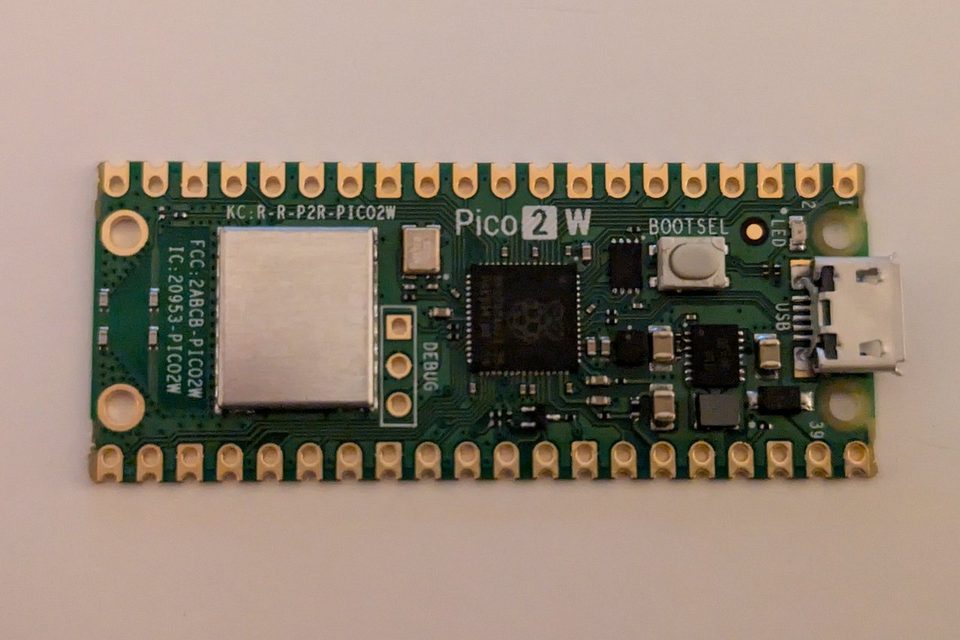
The last message from the garage arrived at 02:14 on a Tuesday in June: 29.6°C, 81 percent humidity, heartbeat 41,388. Then nothing. The board hadn't failed. The power had, for half the block, during one of those storms that parks over southwest Houston and refuses to move, and I knew inside of ten minutes because a box on a UPS in my closet noticed that a $7 board had stopped talking and pushed a message to my phone. The silence was the alert. It's the most useful thing I built this year, and the parts cost less than the pho I ate the next morning when the place on Bellaire opened at seven.
That board is a Raspberry Pi Pico 2 W, the wireless version of the Pico 2, and I've had five of them doing small jobs around the house for about seven months. Raspberry Pi lists it at $7, against $5 for the plain Pico 2. The two dollars buy 2.4GHz 802.11n Wi-Fi and Bluetooth 5.2 with the antenna on the board, plus modular compliance certification for the radio, which as I understand it matters most to the people who buy these in the 480-unit reels Raspberry Pi also sells and ship them inside products. Everything else is the same spec sheet. Two dollars is the whole decision. I paid list for all five, and for a sixth I'll get to later, because I killed it.
the part everyone gets wrong
People file a Wi-Fi microcontroller under one of two headings: toy, or the insecure IoT junk I'm supposed to be warning you about. Both readings judge the board, and the board is the least risky thing in the picture. The chip on it, RP2350, carries a security kit I'd be pleased to find on hardware costing forty times as much. Arm TrustZone for Cortex-M, which splits the processor into a secure side and a normal side so a bug in one doesn't automatically hand over the other. Signed boot. 8KB of antifuse OTP for key storage, which is one-time programmable memory where writing a bit means physically blowing a fuse. SHA-256 acceleration, a hardware true random number generator, and fast glitch detectors, which watch for the voltage and clock tampering attackers use to make a chip skip an instruction.
Raspberry Pi documents all of it, secure boot ROM included, available to anyone without restriction, and its product brief takes an open swipe at the "security through obscurity" of legacy vendors. I've spent enough evenings with datasheets that redact the one page I needed to appreciate that. A security feature you can read about is one you can reason about.
Here's the thing, though. Every one of those features is a tool, and none of them writes your firmware. Signed boot means nothing until you've put a key in that OTP, and TrustZone does nothing for code that never asked for a secure side. When you flash your own Python onto a $7 board and join it to your home Wi-Fi, you're the firmware vendor, the patch team and the security review, and you're working for free. You're the vendor now. That's the actual review. The silicon is excellent, and the weakest link on my network is a script I wrote at 1am with a cold coffee next to the keyboard.
what seven dollars gets you
Straight from Raspberry Pi's own brief, here's the core spec, with the plain Pico 2 next to it because that's the choice you're actually making:
| Pico 2 | Pico 2 W | |
|---|---|---|
| List price | $5 | $7 |
| Wireless | none | 2.4GHz 802.11n, Bluetooth 5.2, on-board antenna |
| CPU | dual Arm Cortex-M33 or dual Hazard3 RISC-V, 150MHz | same |
| Memory | 520KB SRAM, 4MB QSPI flash | same |
| GPIO | 26, 3 of them usable for ADC | same |
| Board size | 21 x 51 mm | same |
Your program and files live in the 4MB of QSPI flash, and the 520KB of SRAM is working memory. Raspberry Pi says both are double what the first Pico had, with a higher clock on top. Around the pins you get 2 UARTs, 2 SPI controllers, 2 I2C controllers, 16 PWM channels, a USB 1.1 controller and PHY that can act as host or device, and 12 PIO state machines. PIO is the part I'd tell a newcomer to read about first. These are tiny programmable I/O engines that sit next to the pins and run timing-sensitive protocols on their own, so your main code isn't busy counting microseconds.
Where it gets strange, in a good way, is the CPU choice. RP2350 carries two pairs of cores, Arm Cortex-M33 and Hazard3 RISC-V, the second pair open hardware, and you pick which pair runs. I flipped one bench board to the RISC-V cores for an evening out of pure curiosity. My sensor script didn't notice, and I don't have a benchmark worth printing, so I won't print one. I went back to Arm because that's what I'd been building against, which is a lazy reason and the true one.
Compatibility is the quiet selling point. Raspberry Pi says the Pico 2 series keeps hardware and software compatibility with the earlier Pico family, and my two scripts from a first-generation Pico moved over without edits. That's a sample size of two, and I'm reporting it as exactly that.
What the five survivors actually do:
- Closet: sits next to the NAS boxes, reads temperature and humidity from a cheap I2C sensor, posts every 60 seconds to a small collector on the homelab.
- Garage: the heartbeat board from the opening. It's on wall power on purpose, the only device in the house I want to go down in a storm, because its death is the signal.
- Side gate: a reed switch on one GPIO pin, logging every open and close.
- Utility room: a water probe under the water heater, read through one of the ADC pins, which has so far reported dry 100 percent of the time and which I check anyway.
- Bench: rotates. Currently blinking an LED at me for reasons I've forgotten.
In hours rather than features, here's what it cost. The first board took about three and a half hours from bag to a reading on my homelab, and almost none of that was the board. It was Wi-Fi credentials, my own firewall rules, and one typo in an IP address that I stared at for forty minutes. The fifth took twenty minutes. Across seven months I'd put the total near eleven hours, plus the evening I spent mourning board six.
where it breaks
Start with the radio, which is 2.4GHz only. That's the crowded band, shared with every router on my street and at least one microwave, and the garage board drops off for a minute or two most evenings around dinner. I've chosen to believe it's the neighbor's microwave and haven't proven it. The practical fix was setting the silence alert to ten minutes instead of two, which is why the storm page took ten minutes to reach me and why I don't get paged over leftovers.
Range aside, the board shares a network with whatever it can reach. Mine live on an IoT VLAN that can talk to one collector on one port and nothing else, because the radio is the attack surface, and I wrote the code behind it. If I'd written something exploitable, and I might have, the blast radius is a VLAN with nothing on it worth stealing.
Then my admission: I haven't turned on signed boot on any of the six. Antifuse means permanent, and the idea of burning a key into OTP wrong, on a board I'd then own forever as a paperweight, scared me off more than it should have. At $7 a board that's an embarrassing reason. So every one of mine runs unsigned code, and anyone who can get their hands on one can put their own code on it over USB. For a sensor in my closet that's a threat model I can live with. For the board on a side gate facing the alley, I'm less sure, and I keep meaning to fix it.
Board six died on my bench in April. I set it down while it was running, on the steel ruler I keep by the soldering station, and something on the underside touched something it shouldn't have. Raspberry Pi's safety sheet says, in plain words, not to place it on a conductive surface while it's operating. I'd read that sheet. Cost: $7, and an evening of convincing myself it wasn't my code.
I want to be careful here, because the reliability number in the brief is easy to misread. MTBF, mean time between failures, is listed at 182,000 hours under "ground benign" conditions, which works out to about 20.8 years. MTBF isn't a lifespan. It's a statistical failure rate across a population of boards, and "ground benign" describes a climate-controlled room, which my garage in August isn't. The operating range runs from -20°C to +85°C, and Houston heat doesn't come near the top of that. Moisture is the real problem. The same safety sheet says to keep it away from water and moisture, and the garage read 81 percent humidity the night of that storm. That board lives in a sealed project box now.
Production is the other long number. The brief says the Pico 2 will remain in production until at least January 2040, and Raspberry Pi's product page makes the same promise for the whole Pico 2 series, the W included. That's a longer commitment than most of the Wi-Fi gear in my house will ever get from its vendor, and it's why I'm comfortable standardizing on one board instead of chasing whatever's cheapest this month.
One more from the warnings page. Any external power supply should meet local regulations and be a limited power source per IEC 62368-1, and the 1.8-5.5V DC input range is generous enough that it's tempting to stop caring. My dad spent thirty years as a machinist by the ship channel, and his rule for anything with a wire is to know where the power comes from before you care what it does. The gas station charger I found in a kitchen drawer went in the trash, not into the garage.
what to do
- Buy the W unless you're certain the project will never want a network. Two dollars is the cheapest regret insurance I've reviewed.
- Give it its own VLAN or guest network, with exactly the access it needs, before the first script runs.
- Build a heartbeat into everything and alert on silence, with a threshold longer than your neighbor's microwave.
- Read the secure boot documentation before you burn anything into OTP, and practice on a board you've already written off.
- Keep it off conductive surfaces while it's powered, handle it by the corners, and box it if it lives anywhere humid.
- Power it from a supply you'd trust with your phone.
Seven months in, the five survivors have sent me one real alert, the storm, and something like forty false ones during the dinner hour. I've left the threshold where it is. One true page at 2am is worth forty I swipe away over rice, and I'd rather tune my patience than my alerting.
Alert on the silence, not just the readings.