Nicholas TongKeePassXC
04 / 46
KeePassXC: a file, and everything that implies
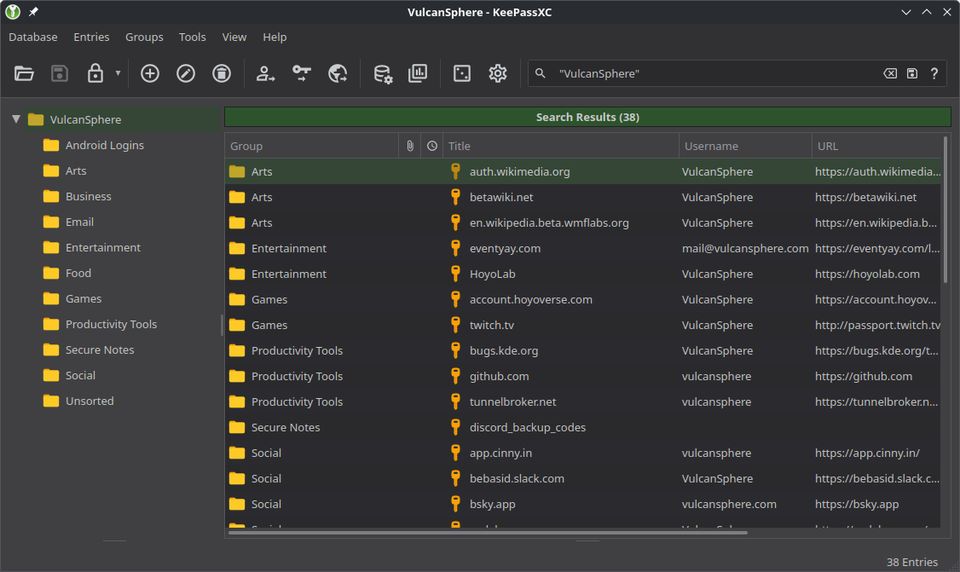
There was a USB stick taped under a desk at the MSP, in an office that smelled like burnt coffee and toner, with a label in silver Sharpie that said AMBER DO NOT FORMAT. Amber was the office manager's daughter. The stick held the shared password database for every vendor portal that company had, in KeePass format, and the stick existed because the office wifi could not be trusted to sync anything and nobody wanted to spend money fixing that. I was twenty-two and I thought it was insane. Eight years later I think it was half sane.
KeePassXC is the modern cross-platform version of that idea: one encrypted file, no accounts, no cloud, GPLv3, free. Version 2.7.12 is current and a 2.8.0 beta with the Qt6 migration just landed in September. I have run it as my primary for about four years alongside the hosted managers I review. Here's the honest accounting.
the part everyone gets wrong
People hear "no cloud" and translate it to "more secure," and that translation skips a step. A local file removes the server attack surface, the sync provider, and the vendor, and in exchange it hands you every operational problem those things were solving. Availability, backup, device-to-device movement, key rotation across machines. KeePassXC does not have those problems because you do. It's a trade, not an upgrade.
The security credentials are real, for what they're worth. The 2.7.9 release passed ANSSI's CSPN first-level certification in France, published on their audits page, which is an actual third-party test and not a badge the project drew itself. The format underneath is KDBX 4, encrypted with AES-256 or ChaCha20, key derivation via Argon2id. None of that is exotic. It's just careful.
the mechanics
You create a database file. You protect it with a passphrase, optionally a key file, optionally a YubiKey challenge-response slot, which is the setup I run, and the file is the whole vault. There is no account anywhere. The app phones home for nothing: no telemetry, no update check unless you turn one on, and the browser extension, KeePassXC-Browser, talks to the desktop app over a local socket with a per-connection key exchange rather than through any cloud relay.
Auto-Type is the underrated feature. The window-title matching pattern from that USB stick era survives into 2026: you park focus in a login form, hit the global shortcut, and the app types username, tab, password, on the theory that the operating system's own keyboard is harder to intercept than a browser extension's fill API. It still works on Wayland in the 2.8 beta, which took them years, and I mean that as a compliment about stubbornness rather than speed.
Where the file goes is up to you. Syncthing, a NAS share, a git-annex repo, a stick in a drawer. The project deliberately stays out of that decision, and that restraint is the design.
where it breaks
Sync is where people get hurt, and I include myself. This is going to sound paranoid, but the most dangerous file on my laptop for two years was a .kdbx sitting in a synced folder, because every sync engine treats a locked database as a changeable file, and when two devices write at once you get conflict copies with names like passwords (conflicted copy 2024-03-11).kdbx. The wrong one is newer and the right one is stale, and the app cannot tell you which. My admission: I deleted a conflict copy without diffing it in early 2024 and lost about a week of entries, including the credentials to a client's staging Jenkins that I then had to beg a sysadmin to reset at 4pm on a Friday.
The rest of the friction list:
- Mobile is third-party by policy. KeePassDX on Android and KeePassium or Strongbox on iOS are good apps, but you're now trusting two more teams, and remote databases over their sync layers reintroduce every cloud problem you just paid nothing to avoid.
- The browser extension setup is fiddlier than commercial managers, with a connection-per-browser key exchange that stops working when you move the database path and don't update the associated entry.
- One file is one point of failure. Bitrot, ransomware, and fat fingers all operate at file granularity, and KeePassXC will not save you from any of them.
- Shared databases, like Amber's stick, rely on the merge feature and human discipline, and I have watched human discipline lose that fight more than once.
what to do
- Turn on Argon2id with the memory cost your weakest machine can tolerate, and add a key file or YubiKey slot if you'll actually carry it.
- Put the database in Syncthing or an equivalent that keeps versions, never in a plain cloud folder that replaces files.
- Keep three copies on two media with one offsite. The database is one file; copying it is the only backup strategy that exists here.
- Set a monthly reminder to open the backup copy and type one password from it. The reminder is the feature.
- Leave the shared-database mode for teams with an actual admin, which that company in 2019 did not have and which is why Amber's name is on a label in this post.
I still have the stick. It's in a drawer with a dead YubiKey 4 and a ticket stub from an Astros game I don't remember attending, and I have never formatted it, in case that was load-bearing.
Diff your conflict copies before deleting any of them.