Nicholas TongCryptomator
45 / 46
encrypt the files, not the disk
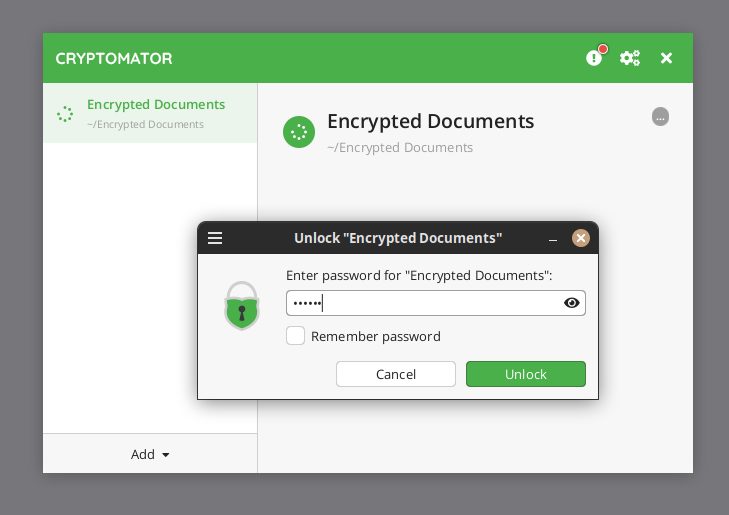
The vault that mattered was a folder of my parents' scanned paperwork. Passports, tax records, the deed, all photographed on a Sunday afternoon with a phone and a lamp, because my mother asked, in the specific tone mothers use, what would happen to the documents if the house ever flooded. Hurricane season was three weeks out. The answer was a sync folder, which meant the answer was a cloud provider's security page, which is not an answer. I put the scans in a Cryptomator vault before I went to bed that night, and I remember the timestamp on the last file because it was later than it should have been.
Here's the thing. Full disk encryption, the BitLocker toggle everyone treats as the finish line, protects the laptop. It does nothing for the copy of the file that leaves the laptop. The moment a document syncs to Dropbox or a backup service, you have traded a disk you control for a bucket you do not, and the provider's promises are not encryption. Cryptomator's entire job is to keep the encryption on your side of that line: it creates a vault folder, encrypts every file inside it individually, and the cloud only ever sees ciphertext with scrambled names.
what it actually is
An open source encryption tool for files, not disks. Desktop apps for Windows, macOS, and Linux are free, and the source is public and audited, with a security assessment by Cure53 on the books. Mobile used to be paid and is now freemium, as of a July 2026 change on Android. Pricing moved in 2026 too: the single license went from around 15 euros to 29.99 euros starting January 1, and Cryptomator Hub, the team key-management product, is priced for organizations, not households. Under the hood it is AES-256 with a per-file structure, so adding one document re-encrypts one document, and sync only uploads what changed. That last design choice is the reason it works with ordinary sync clients instead of replacing them.
It is also deliberately shallow. There is no plausible deniability mode, no hidden volume, no container you can mount as a drive letter with a password you keep in your head alone. A vault is a folder. You unlock it with a password, optionally layered with a keyfile, and the password is the whole game.
the part everyone gets wrong
People compare it to VeraCrypt and argue about which is "more secure," which is a category error in both directions. VeraCrypt builds containers, which are great for an archive that changes never and terrible for a folder that syncs, because every edit means uploading the whole container and hoping the sync does not corrupt it mid-flight. Cryptomator encrypts per file, which is exactly the shape cloud sync needs and exactly the shape a snoopy roommate or a forensic examiner can read: the structure is visible. File count, file sizes, modification times, all metadata, all in the clear. Encryption is not anonymity. If your threat model includes someone counting your files, neither tool helps you.
The second misread is about what the password protects. I want to be careful here, because this is the part that actually hurts people. Cryptomator has no account, no recovery email, no reset link. That is a feature. It is also a guillotine. Lose the password and the keyfile together and the vault is gone forever, not "locked," gone, and the vendor cannot help you because the vendor genuinely has nothing to help with.
the mechanics, in ops terms
Daily use is dull, which is the compliment. Unlock on login, the vault shows up as a drive, work inside it, lock when you step away. On the family side, my parents' setup is one vault for documents, one for my dad's machining notes, both syncing to the same cloud account, and the provider's client just sees two more folders full of noise.
The integration model is worth spelling out, because it is the actual product decision. Cryptomator does not want your cloud credentials. It does not talk to the API. It encrypts bytes in a folder and lets Dropbox or OneDrive or Syncthing do what they already do. That means no vendor lock on the storage side, and it also means every failure mode of your sync client is still your problem, plus one new one: if a sync conflict ever duplicates a vault file, the duplicate is also encrypted, so the failure is silent instead of catastrophic.
One habit ties the whole thing together, and it is the same habit as backups. An untested vault is a wish. Restore the thing. I keep one small test vault and check, every few months, that a file pulled from cold sync actually opens with the password written in the actual paper notebook.
where it breaks
The password, first, always. This is the failure mode that ends in real loss. Password managers forget, humans forget faster, and the paper notebook in the safe is not a joke, it is the recovery plan. My mother's vault password lives in two places: my head and a notebook in a fire box, and I am the weaker of the two backups because I fly on airplanes and eat gas station sushi.
Sync conflicts, second. Edit the same file from two machines offline and the sync client will produce a conflict copy. Inside a vault this is encrypted and reconcilable by hand, but if you have never resolved a conflict copy before, budget an evening and a calm mind.
Mobile is the third break. The iOS app is paid and good. Android was paid, went freemium in July 2026, and community threads still gripe about virtual drive behavior on phones. Fine for reading documents in a waiting room. I would not make a phone the primary home of a vault.
And the threat model, last, because the tool cannot save you from yourself. If the laptop is compromised while the vault is unlocked, everything in it is readable, full stop. Encryption at rest is not protection against a keylogger on the machine you type the password into. People buy encryption tools to feel safe from everything, and no file-level tool delivers that.
what to do
- Put anything that leaves the house in a vault: scans, tax PDFs, photos of cards, anything with a number on it a stranger could use.
- Use a long passphrase plus a keyfile, and write the recovery plan down on paper before you need it. The passphrase for the manager, the keyfile in the fire box, or whatever split you can actually maintain.
- Test the restore, on a schedule, from the cold copy. Backups are not real until you have restored from them, and neither are vaults.
- Keep the vault small enough to sync fast. A 200GB vault is not a vault, it is a monument.
- Do not store the only copy of anything inside a sync folder, vault or not. Cloud sync is replication, not backup, and it will faithfully replicate your mistakes.
One useless detail to close: the test vault is named vault-check and lives next to a folder called pho-recipes that contains one photo of a broth pot my ba sent me in 2021, which has nothing to do with encryption and everything to do with why the folder will never be cleaned up.
The admission: I do not actually know whether my mother has opened her vault since I set it up. I check the sync logs instead of asking, which is easier and less honest, and if the logs ever went quiet I would not know what it meant, and that gap bothers me more than any crypto detail in this post.
The encryption was never the hard part. Telling your family where the password lives is.